
IT Budget Planning: A Practical Guide for Business Owners
A good IT budget starts with your business goals, not last year’s invoices. List what technology your company needs to run and grow over the next 12 months. Rank those needs by risk and value. Price each one, add a reserve for surprises, and review the plan every quarter. This guide walks through that process in plain terms, so you can finish a first draft this month.
It is written for owners and operators of small and midsize businesses. That includes the person who also “handles IT” because nobody else does.
TL;DR
- Build the budget from business priorities and risk, then price it. Adding a few percent to last year’s lines is how budgets drift out of step with the business.
- Split spending into recurring costs (licenses, support, security, backup) and one-time costs (hardware, migrations, projects). Each behaves differently.
- Treat cybersecurity and recovery as risk management, not a shopping list of tools.
- Keep a reserve for the failures no plan predicts, and review the budget quarterly.
- If you have no in-house IT leader, a managed provider or a virtual CIO can own the roadmap behind the numbers.
Table of Contents
- What an IT budget actually is
- Why last year’s budget plus 3% fails
- Step by step: how to plan your IT budget
- What belongs in an IT budget
- A worked example
- Security and recovery: budget for the day it goes wrong
- Build, buy, or share: choosing how IT gets done
- Our perspective
- Common budgeting mistakes
- A simple annual rhythm
- Where a managed partner fits
- FAQ
- Sources
What an IT budget actually is
An IT budget is the plan for what you will spend on technology over a set period, usually a year, and where that money goes. NetSuite describes it as the total funding allocated to an organization’s technology needs, spread across the categories and departments that use them.
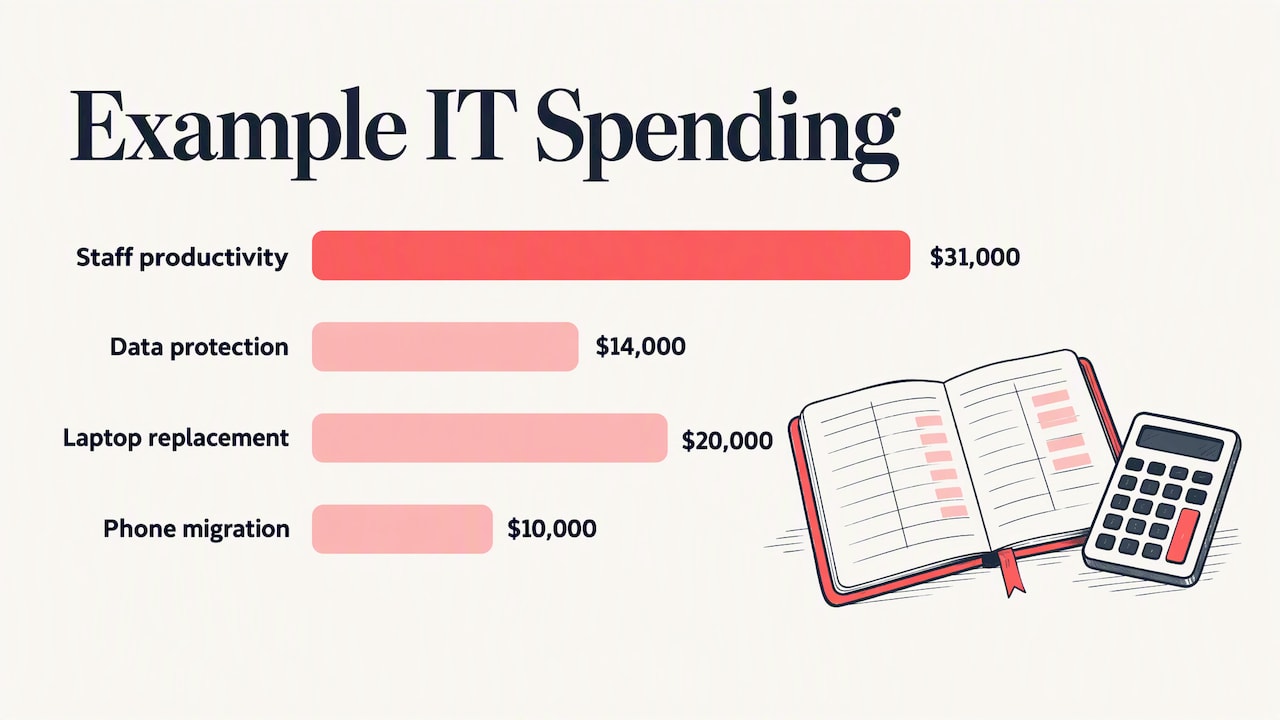
The number matters less than the logic behind it. A budget that says “$90,000” tells you nothing. A budget that says “$31,000 to keep 25 users productive, $14,000 to protect and recover data, $20,000 to replace aging laptops, $10,000 for a phone migration, and a reserve for the unexpected” tells you what you are buying and what you are not.
Technology is also a large line for most firms. One industry roundup estimates that US small and midsize businesses spent about $194 billion on technology products and services in 2024. Whatever your size, you are not spending in a vacuum, and the question is whether the money is chosen or simply accumulates.
Why last year’s budget plus 3% fails
Incremental budgeting is the default. You take last year’s lines, nudge them up, and move on. NetSuite’s guidance notes that this often leaves spending out of step with current needs, such as a cloud migration or stronger security for remote staff.
Three things usually go wrong:
- Hidden growth. Every new hire adds a license, a device, and a security seat. Subscription prices also tend to move on renewal.
- Hidden decay. Hardware you bought four or five years ago does not announce when it will fail. It just fails, on a busy Tuesday, at emergency prices.
- Hidden risk. If last year had no security line worth the name, “last year plus 3%” gives you the same exposure with a slightly bigger invoice.
A better method starts from what the business is trying to do. Gartner’s work on strategic IT budgeting makes a similar point: without a forward-looking plan, executives tend to see IT as a cost, not an investment.
Step by step: how to plan your IT budget
1. Take inventory of what you have
You cannot budget for what you cannot see. List every user, device, server, network component, software subscription, and cloud service. Note the owner, the renewal date, and the age of each item.
This is less daunting than it sounds. For very small businesses, federal small business security guidance says an information inventory can typically be done in a few hours by identifying where critical data lives and ranking it by importance to the business.
Watch for duplicates. Two file-sharing tools, three password managers, and a forgotten trial subscription are common finds, and each is a line you can cut.
2. Review what you actually spent
Pull 12 months of invoices and card statements. Sort them into categories (see the table below). Include the costs nobody labels as IT: the owner’s hours spent troubleshooting, the downtime when email went out, the consultant you called twice in a panic.
Those unlabeled costs are often the strongest argument for changing how you buy IT.
3. Define business priorities first
Ask what changes in the next 12 months. Are you hiring, opening a second office, moving to a new line-of-business application, taking on a client with stricter security requirements, or planning a merger? Each of those drives technology cost.
Write down three to five priorities. Every major line in the budget should trace back to one of them, or to keeping the lights on.
4. Rank by risk, not just by want
Security spending deserves its own pass. NIST’s small business guidance frames the work as a sequence: determine the value of your information, inventory the technology that touches it, and understand the threats, then use that to prioritize and focus security efforts. CISA’s primer for executives makes the same case: cybersecurity is about managing risk to the organization, not ticking off a requirements checklist.
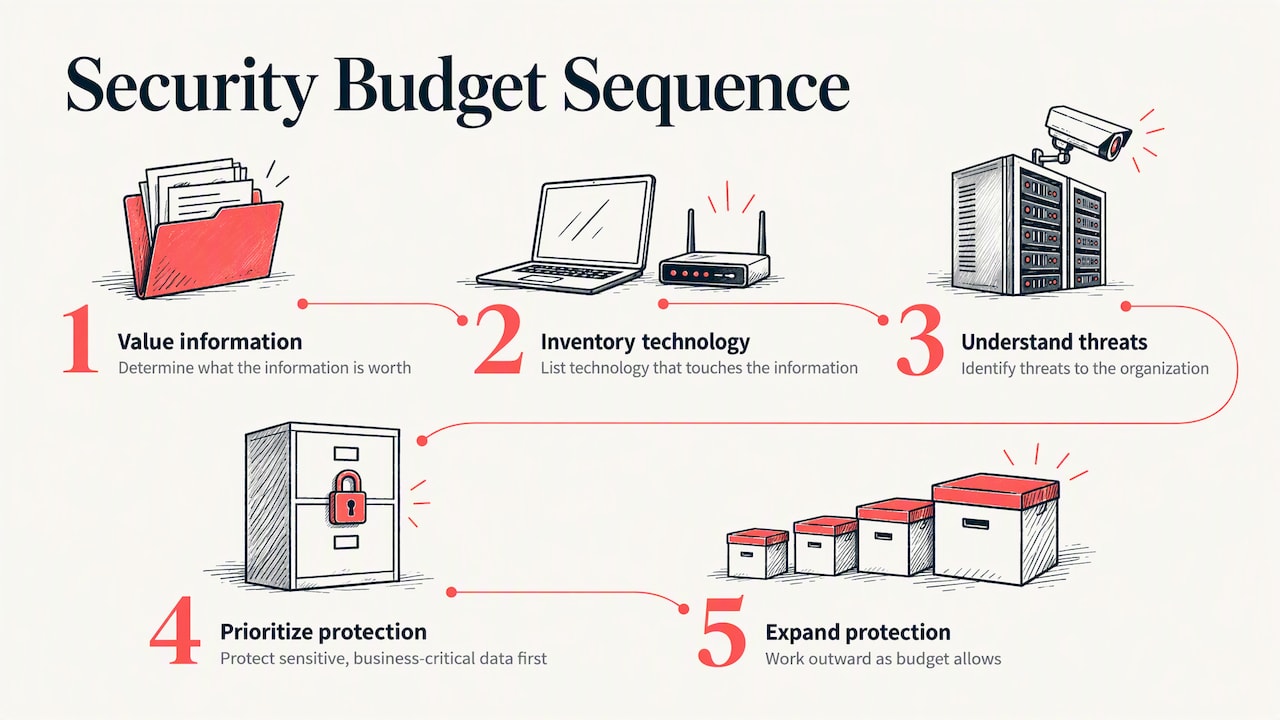
In budget terms, that means you do not try to buy every protection. You protect the most sensitive and most business-critical data first, then work outward as money allows.
5. Forecast needs and price them
For each priority, estimate cost with real quotes where you can. Separate:
- Recurring costs, which repeat monthly or annually: licenses, support, security tools, backup, internet.
- One-time costs, which happen once: hardware refreshes, migrations, cabling, a new firewall.
- Project costs, which have a start and an end: moving to a new platform, a compliance effort, an office move.
The Digital Transformation Hub’s budgeting guide comes with a template and explanations if you prefer to work in a spreadsheet. It is an Australian government resource, so treat its examples as structure, not as US pricing.
6. Add a reserve
Something will break or change. A reserve line, set aside as a percentage of the total that fits your risk tolerance, keeps one bad week from forcing you to raid another department’s budget. Agree on who can release it and for what.
7. Get finance and operations aligned early
NetSuite notes that proactive budgeting means finance and IT talking several months before the fiscal deadline. If your fiscal year starts in January, October is the time to begin. Showing the draft to the person who controls cash flow avoids a painful cut in December.
What belongs in an IT budget
Use this table as a starting checklist. The “how it behaves” column tells you how to forecast each line.
| Category | Typical items | How it behaves |
|---|---|---|
| Support and management | Help desk, monitoring, patching, vendor management | Recurring, scales with users and devices |
| Cloud and software | Microsoft 365 or Google Workspace, line-of-business apps, SaaS tools | Recurring, rises with headcount and renewals |
| Cybersecurity | Email filtering, endpoint protection, MFA, training, security monitoring | Recurring, plus periodic assessments |
| Backup and recovery | Backup software, storage, recovery testing | Recurring, grows with data volume |
| Hardware | Laptops, desktops, servers, firewalls, switches, Wi-Fi | One-time, on a replacement cycle |
| Connectivity | Internet, phones, circuits | Recurring, changes with locations |
| Projects | Migrations, office moves, new systems | One-time, tied to business priorities |
| Strategy and compliance | Planning, audits, policy work | Recurring or periodic |
| Reserve | Unplanned failures, urgent changes | Held back, not spent by default |
One published benchmark gives a sense of how the mix looks. A compilation of SMB data shows cloud services at about 38% of the typical small business IT budget, cybersecurity at 14%, and hardware at 13%, citing SMB Group’s 2025 figures. Use numbers like these as a sanity check only. Your mix depends on your industry, your data, and how much of your environment is already in the cloud.
A worked example
Imagine a 25-person professional services firm in Central Indiana. These numbers are illustrative, not a benchmark or a quote.
- Priority one: keep staff productive with fewer outages.
- Priority two: meet a client’s new security questionnaire.
- Priority three: replace eight laptops that are past their useful life.
The owner groups costs as follows: recurring support and cloud licenses first, then a security upgrade (multifactor authentication, email protection, staff training, tested backups), then a three-year laptop replacement schedule that spreads the eight machines across years instead of buying them at once, then a reserve.
The result is a plan that explains itself. When the owner is asked why security went up, the answer is the client questionnaire. When someone asks why laptops cost money this year, the answer is the replacement schedule. That traceability is the real value of the exercise.
Security and recovery: budget for the day it goes wrong
Most owners underbudget for recovery because it feels abstract. The question to ask is concrete: if your server room flooded or ransomware locked every file, how long could you operate, and what would that cost per day?
The federal small business guidance asks businesses to consider contingency and disaster recovery planning: what happens after a disaster such as a flood or tornado, or a contingency such as a power outage, and whether you have a plan to recover. Put a number on your answer. Then budget for backups that are tested, not merely running.
A useful rule: whatever the cost of a day of downtime is for your business, the budget for preventing and recovering from it should be proportionate. If you cannot estimate it, that is a sign to get an outside assessment.
Build, buy, or share: choosing how IT gets done
Budget planning is also where you decide who does the work. There are three common models.
| Model | Fits when | Budget shape |
|---|---|---|
| In-house only | You have enough work and complexity to keep specialists busy | Salaries, benefits, tools, training; hard to cover vacations and gaps |
| Fully managed provider | You have no IT staff or want a single accountable partner | Predictable recurring fee, plus projects |
| Co-managed | You have an IT person or small team who needs backup and specialist depth | Recurring fee for the shared pieces, plus internal salary |
None of these is right for everyone. The point is to pick on purpose and price it fully. A single in-house technician looks cheaper than a managed contract until you count vacation coverage, security tooling, training, and the day that person leaves.
Our perspective
We talk to business owners in Indianapolis and Central Indiana who have never had an IT budget. They have a pile of invoices, a few emergency calls, and a feeling that technology costs more than it should. In our experience, the problem is rarely the total. It is that spending has been reactive: a fix here, a purchase there, nobody looking at the whole environment.
That is why we manage IT as one integrated environment rather than as separate fixes. When one team is accountable for support, security, backup, and cloud, we can look for root causes, not repeat the same patch. Recurring problems become a line item you can eliminate, not a surprise you re-buy every quarter.
Our advice on budgets is simple. Start from the business, not the tool list. Decide what you most need to protect. Spread hardware cost across years. Keep a reserve. And make sure someone is responsible for the roadmap, whether that is an internal leader or a virtual CIO.
— Cameron
Common budgeting mistakes
- Budgeting only for tools. Software without the people or process to run it creates cost without protection.
- Ignoring the owner’s time. If you spend five hours a month fixing printers, that is a cost, even without an invoice.
- Skipping recovery testing. A backup you have never restored is a hope, not a plan.
- Buying hardware all at once. A single large refresh creates a cash spike and a cliff four years later.
- No renewal calendar. Auto-renewals at higher prices are an easy, avoidable leak.
- Treating the budget as a one-time document. Businesses change mid-year. A quarterly review keeps the plan honest.
A simple annual rhythm
- October to November: inventory, spend review, priorities.
- November to December: price projects, draft, review with finance.
- January: approve and publish the budget internally, with the renewal calendar.
- Each quarter: compare actuals with plan, adjust projects, and re-rank risks.
- Each year: repeat the inventory. It will be faster the second time.
Where a managed partner fits
If your company has no one who can own this roadmap, that is the gap we fill. Our vCIO and IT consulting service helps leadership connect technology plans to business goals. Our managed IT services cover day-to-day support under one accountable team, and our cybersecurity services address the risk-based priorities described above. If you already have an IT person, co-managed IT adds depth without replacing them.
Not sure where to begin? Our free IT assessment gives you a view of your current environment, which is the first input for any realistic budget.
FAQ
What should be included in an IT budget?
Include support, cloud and software subscriptions, cybersecurity, backup and recovery, hardware, connectivity, planned projects, and a reserve. Separate recurring from one-time costs so you can forecast each properly. Add compliance or client-driven security work if your industry requires it.
How do I plan an IT budget if I have never had one?
Start with an inventory of users, devices, and subscriptions, then pull the last 12 months of IT-related invoices. Group them into categories and list your top business priorities for the coming year. Price each need, add a reserve, and review quarterly.
How much of my budget should go to cybersecurity?
There is no single correct share. One compilation of SMB data puts cybersecurity at about 14% of the typical IT budget, but your data, industry, and client requirements matter more than an average. Rank your most sensitive information first and fund protection of that before anything else.
Should I hire an IT person or use a managed provider?
It depends on workload and complexity. A managed provider gives you a team and predictable recurring costs, while a hire gives you a dedicated person who knows your business. Many organizations combine the two through a co-managed arrangement.
Sources
- NetSuite: IT Services Budgeting: How-To & What to Include
- Stealth Agents: SMB Tech Spending Stats 2026
- NIST ITL Bulletin: Fundamentals of Small Business Information Security
- CISA: Cyber Risk Management Primer for CEOs
- Small business information security: the fundamentals
- Gartner: Strategic IT Budgeting
- Digital Transformation Hub: How to develop your annual technology budget