
Proactive IT Support: What It Is and How to Get It
Proactive IT support means someone watches, patches and plans your technology continuously, so problems are fixed before your staff notice them. Reactive support waits for a ticket. The proactive model treats your network, devices, cloud accounts and backups as one environment that needs steady maintenance, the way a building needs more than a repair call after the roof leaks.
If your IT help feels unreliable, your office network crawls every afternoon, or the same issues keep coming back, this guide explains what changes when support turns proactive, what it should include, and how to tell a real proactive provider from one that only uses the word.
TL;DR
- Proactive IT support is continuous: monitoring, patching, backup checks, security controls and planning, not just answering tickets.
- It matters most for security. Attackers go after unpatched edge devices and stolen credentials, and small businesses are exposed.
- Slow networks and repeat outages are usually symptoms of a root cause nobody is paid to look for under break-fix.
- To improve weak IT support, baseline what you have, write down service levels, and standardize procedures.
- Ask any provider what they monitor, how fast they patch, what they report, and who is accountable.
Table of Contents
- What proactive IT support actually means
- What a proactive service should include
- Why proactive matters for security
- Slow office network? Start with root causes
- Signs your current IT support is unreliable
- How to improve IT support, step by step
- How to judge a proactive provider
- Our perspective
- Where Curetopia fits
- Common objections
- FAQ
- Sources
What proactive IT support actually means
The plain definition: your provider spends most of its effort on preventing incidents, not responding to them. Freshworks describes it as preventive maintenance for business technology, comparable to regular health check-ups. You do not wait for a server crash or a sluggish application before asking for help.
In practice, the shift is from incident-based work (fix this symptom) to continuous work (manage the infrastructure, audit configuration, plan capacity). That changes who carries the risk. Under break-fix, every outage is billable work for the provider and lost revenue for you. Under a proactive agreement, the provider’s incentive is a quiet environment.
Reactive, proactive and co-managed compared
| Reactive (break-fix) | Proactive (managed) | Co-managed | |
|---|---|---|---|
| Starts when | Something breaks | Continuously | Continuously, shared with your in-house staff |
| Typical focus | The symptom in front of the technician | Root causes, patching, lifecycle, security | Gaps your internal team cannot cover |
| Planning | None | Roadmap and budget | Roadmap, with your team in the loop |
| Downtime | Longer, because discovery comes late | Shorter, because many issues are caught early | Depends on how clearly roles are split |
| Best for | Very small, low-risk setups | Most organizations that depend on their systems | Companies with an IT person or small team |
Neither extreme suits everyone. A company with one capable IT manager may not want to hand over everything, which is the case co-managed support exists for.
What a proactive service should include
Marketing pages all promise “24/7 monitoring.” Look for the specific components underneath it.
- Remote monitoring and management of servers, workstations and network gear, with alerts that someone actually acts on.
- Automated patch management, including firewalls, VPN appliances and other devices at the edge of your network, not only Windows laptops.
- Endpoint and identity security: endpoint detection and response, DNS filtering and multi-factor authentication.
- Backup and recovery that is tested, not just configured. A backup nobody has restored is a hope, not a control.
- Cloud administration for Microsoft 365 or Google Workspace, including licensing, access and configuration.
- Asset lifecycle management: knowing what you own, when warranties end and when hardware should be replaced.
- Strategic planning, often called vCIO work: a technology roadmap tied to budget and business goals.
- Regular reporting that shows what was found, what was fixed and what is still open.
If a proposal lists tools but no reporting and no named owner, you are looking at reactive support with a monitoring agent attached.
Why proactive matters for security
The strongest argument for proactive support is not convenience. It is breach risk.
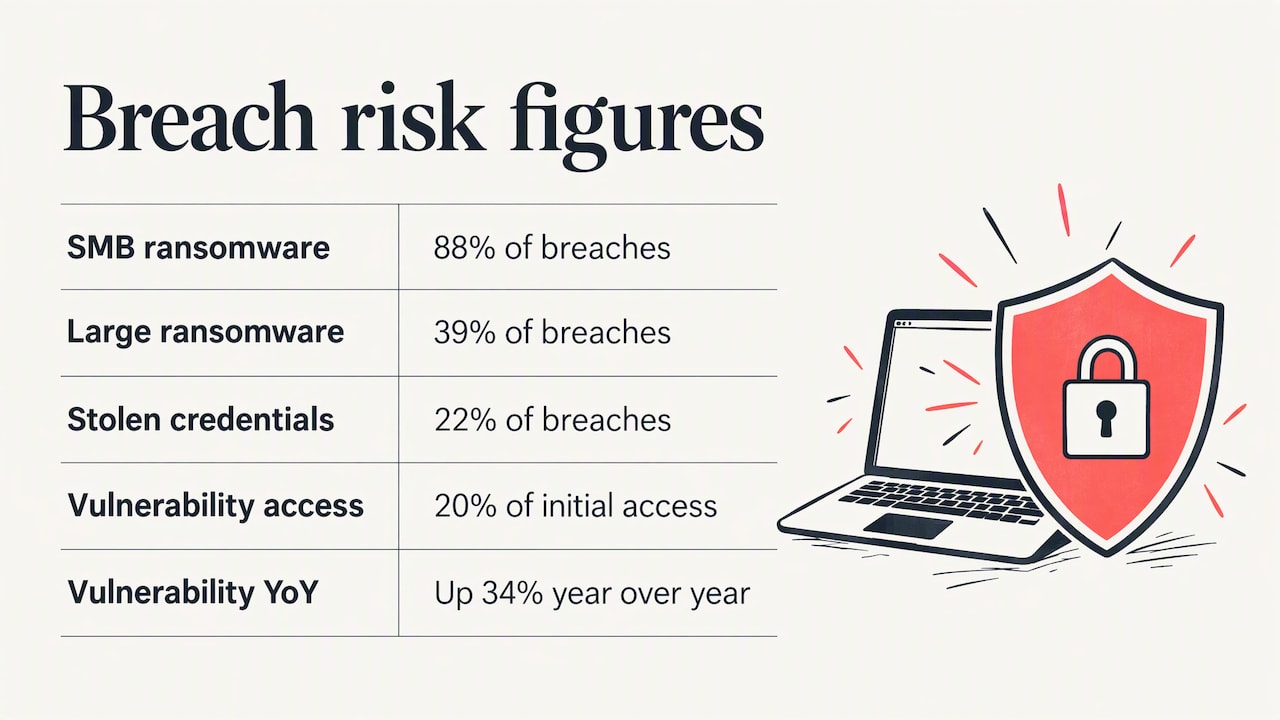
The 2025 Verizon Data Breach Investigations Report found that ransomware appeared in 88% of breaches at small and medium-sized businesses, versus 39% at larger enterprises. Smaller organizations tend to have slower patch cycles and thinner incident response, which makes them easier targets.
Two entry points stand out in the same report summary: stolen credentials, at 22% of breaches, and exploitation of vulnerabilities, at 20% of initial access and up 34% year over year. Both are things proactive work addresses directly. Multi-factor authentication blunts stolen passwords. Timely patching closes the vulnerabilities.
The edge device blind spot
Many businesses assume they are covered because someone “handles IT.” The firewall and VPN are often the forgotten pieces. SecurityWeek’s coverage of the report notes that only 54% of vulnerable edge device issues were fully remediated, with a median of 32 days to fix them. That is a month in which an internet-facing device stays exposed.
A proactive provider closes that window with a defined process: track vendor advisories, test updates, deploy on a schedule, and confirm. Government guidance points the same way. NIST’s bulletin on patching says a systematic approach to managing software patches helps organizations improve security cost-effectively.
Unmanaged devices and phishing
Personal phones and laptops used for work create another gap. The Verizon findings, as summarized by Keepnet, say 46% of devices tied to corporate credentials in infostealer logs were unmanaged. Proactive support includes an inventory of what connects to your systems and policies for what is allowed.
For email threats, CISA’s phishing guidance lays out mitigations aligned with the Cross-Sector Cybersecurity Performance Goals developed with NIST. Those are worth asking your provider to map against.
Slow office network? Start with root causes
A slow network is one of the most common reasons a business starts looking for better IT support. Under break-fix, it goes like this: staff complain, someone reboots the router, speed returns for a day, and the cycle repeats.
A proactive approach asks different questions:
- Is the firewall or switch running outdated firmware or an overloaded configuration?
- Is bandwidth being consumed by cloud backups or large file syncs during business hours?
- Is Wi-Fi coverage designed for the number of devices now on it?
- Are failing cables, aging switches or a saturated internet circuit the real culprit?
- Does monitoring show a pattern, such as slowdowns at the same time each day?
Monitoring data turns “the network feels slow” into a trend you can act on. That is why network and firewall management sits inside a proactive program, not beside it. Our network and infrastructure service is built around that idea: manage the environment so performance problems show up in dashboards before they show up in complaints.
Signs your current IT support is unreliable
Unreliable support rarely fails dramatically. It erodes. Watch for these patterns:
- The same problems return after being “fixed.”
- You learn about outages from employees, not from your provider.
- Nobody can tell you the age of your hardware or when licenses renew.
- Patching happens “when we get to it.”
- You cannot name the person responsible for your overall IT outcome.
- Reports, if any, list tickets closed and nothing about risk.
- Your backups have never been test-restored.
- Security questions from insurers or clients leave you scrambling.
If three or more apply, the problem is probably the model, not the individual technician.
How to improve IT support, step by step
You do not have to switch providers to start improving. These steps work for an internal team or an outside partner. They follow the pattern laid out in InvGate’s guide to improving IT support, which stresses baselining performance, setting clear service levels and standardizing procedures.
1. Baseline what you have
List your devices, servers, network equipment, cloud tenants and key applications. Record ticket volume, common issue types and how long fixes take. You cannot improve what you have not measured.
2. Set service levels in writing
Define response and resolution targets by priority. An outage that stops invoicing is not the same as a request for a new monitor. Write the difference down and hold your provider to it.
3. Standardize the routine work
Onboarding a new hire, resetting access, replacing a laptop: each should follow a documented procedure. Standard procedures cut errors and make support predictable no matter who answers the phone.
4. Fix the recurring issues
Pull the last six months of tickets and group them. The top three repeat causes usually point to a configuration, a failing device or a training gap. Fix those and ticket volume drops.
5. Turn on prevention
Add monitoring, automated patching, multi-factor authentication and tested backups. This is the step that makes support proactive.
6. Review monthly
A short monthly review of open risks, upcoming renewals and project priorities keeps IT connected to business decisions.
How to judge a proactive provider
Ask these questions in any sales conversation and compare the answers:
| Question | A strong answer sounds like |
|---|---|
| What do you monitor? | Servers, endpoints, firewalls, switches, cloud services, and backups, with named alerting |
| How do you patch edge devices? | A defined schedule and verification process, not “as needed” |
| What will I see each month? | A report on incidents, patch status, security findings and roadmap items |
| Who is accountable for my environment? | A named person or team, with a regular review |
| How do you test backups? | Scheduled restore tests with results shared |
| What happens with my in-house IT person? | A clear split of duties, or a full takeover, as you prefer |
| How do you plan for growth? | A technology roadmap tied to budget |
Be cautious of long auto-renewing contracts with vague scope, and of providers who cannot explain their security stack in plain language.
Our perspective
Most of the businesses we meet in Indianapolis and Central Indiana are not suffering from a lack of tools. They are suffering from a lack of ownership. They have a firewall from one vendor, Microsoft 365 set up by another, backups configured years ago by someone who left, and nobody looking at the whole picture. When something breaks, each piece gets patched in isolation and the real cause stays put.
That is why we manage IT as one integrated environment: support, security, cloud, network and planning under one accountable team. We aim to diagnose and resolve root causes instead of applying ad-hoc fixes, because the cheapest ticket is the one that never gets opened.
We also think proactive support should be easy to verify. You should be able to see what is monitored, what was patched, what is at risk and what the plan is for next year. If your provider cannot show you that, ask why.
— Cameron
Where Curetopia fits
If you want proactive IT support without building an internal department, our managed IT services cover day-to-day support, monitoring and accountability for organizations across Central Indiana. Security sits alongside it through our cybersecurity services, and our vCIO and IT consulting turns the technology roadmap into a plan you can budget for.
Already have an IT person or team? Our co-managed IT services add depth and coverage to your staff instead of replacing them. Backup is handled through backup and disaster recovery. We do not publish prices, so the first step is a conversation about your environment. You can start from our Indianapolis managed IT page.
Common objections
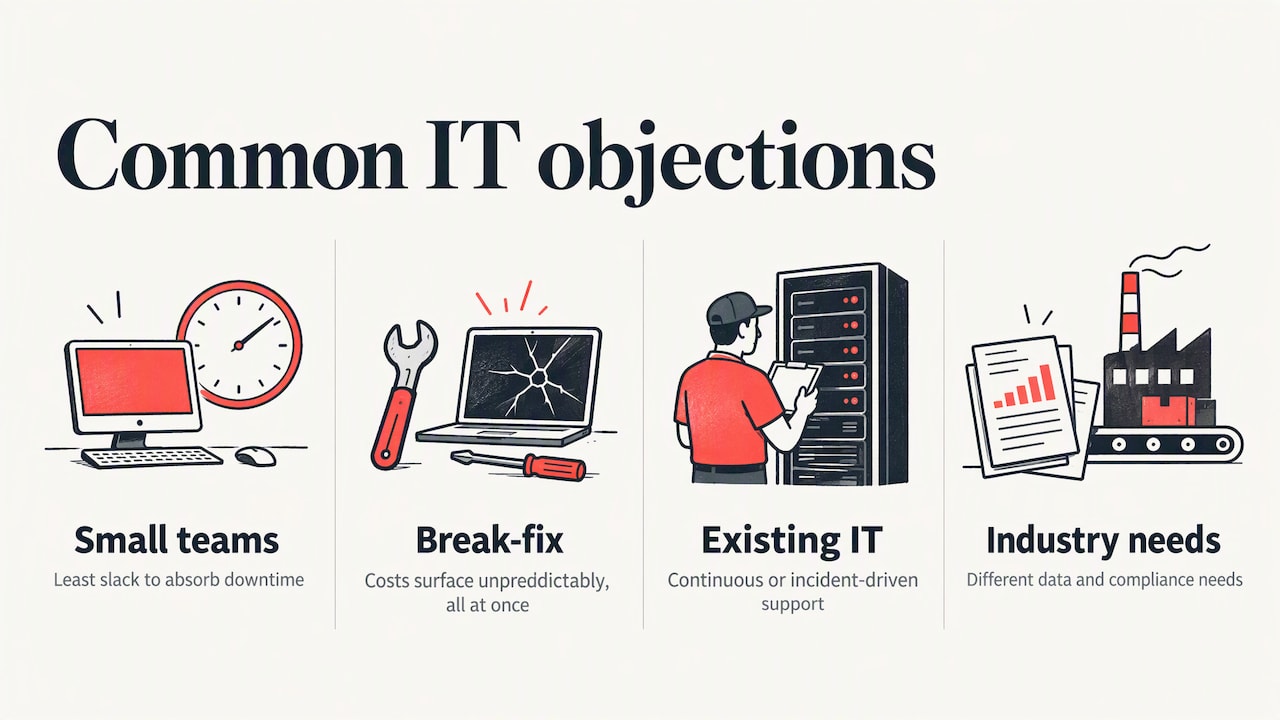
“We are too small for this.” The breach data suggests the opposite. Smaller organizations face a disproportionate ransomware share in the Verizon findings cited above, and they have the least slack to absorb downtime.
“Break-fix is cheaper.” It can look cheaper month to month, until an outage, a ransomware event or a failed restore. The costs of reactive support show up unpredictably and all at once.
“We already have IT support.” Good. The question is whether it is continuous or incident-driven. Run through the unreliable-support signs above and judge honestly.
“Our industry has special requirements.” Many do. Accounting firms, nonprofits and manufacturers have different data and compliance needs, which is why we keep dedicated pages for accounting and CPA firms and nonprofits.
FAQ
What is proactive IT support?
It is IT support that prevents problems instead of waiting for them. A provider monitors systems, applies patches, tests backups, manages security controls and plans upgrades on an ongoing basis. The goal is fewer outages and fewer surprises.
What is the difference between proactive and reactive IT support?
Reactive support, also called break-fix, starts when something fails and ends when it is fixed. Proactive support runs continuously and focuses on root causes, patching and lifecycle management. Reactive models usually mean longer downtime because issues are found late.
How do I improve IT support in my company?
Baseline your current environment and ticket history, set written service levels, standardize common procedures and fix the top recurring issues. Then add prevention: monitoring, automated patching, multi-factor authentication and tested backups. Review results monthly.
Why is my office network slow?
Common causes include outdated or overloaded network equipment, poor Wi-Fi design, bandwidth used by backups or cloud syncs, and a saturated internet connection. Monitoring over time shows the pattern. A rebooted router fixes the symptom for a day, not the cause.
Does proactive IT support replace my in-house IT person?
Not necessarily. Some organizations hand over everything, while others use a co-managed arrangement where the provider covers monitoring, security and projects alongside internal staff. The right split depends on your team’s size and skills.
Sources
- 2025 Verizon Data Breach Investigations Report summary (Keepnet)
- Verizon DBIR Flags Major Patch Delays on VPNs, Edge Appliances (SecurityWeek)
- Proactive IT support: Why and how to implement it (Freshworks)
- Advising Users on Information Technology bulletin (NIST)
- Phishing Guidance: Stopping the Attack Cycle at Phase One (CISA)
- How to Improve IT Support? 9 Ideas For Your Service Desk (InvGate)