
Firewall Management Services for Indiana Businesses
Firewall management services put a team of specialists in charge of configuring, monitoring, updating and reviewing your firewall, so the device at the edge of your network does the job you bought it for. A firewall left on its default settings, or one nobody has looked at since the person who installed it moved on, gives you a false sense of safety. Managed firewall support closes that gap with ongoing ownership, written change records and someone who answers when an alert fires.
This guide explains what the service covers, what good looks like, where outsourcing has limits, and how to decide whether it fits your organization.
TL;DR
- A firewall is not a set-and-forget box. Rules, firmware and logs need regular attention, and management is the work that provides it.
- A real managed firewall service covers rule changes under change control, log and alert monitoring, patching, periodic rule reviews and reporting.
- You can outsource the work, but not the accountability. Ask for written scope, sample reports and clear escalation before you sign.
- For most small and midsize organizations, firewall management works best as part of a broader managed IT and security relationship, not as a standalone contract.
Table of Contents
- What firewall management services actually are
- Why management matters more than the hardware
- What a good service includes, in writing
- How rules, alerts and updates are handled day to day
- Physical and network security work together
- When firewall management makes sense, and when it does not
- What outsourcing does not do
- How to evaluate a provider
- Our perspective
- How Curetopia approaches firewall and network management
- A simple first step: a firewall health check
- FAQ
- Sources
What firewall management services actually are
A firewall controls traffic between networks or hosts that have different levels of trust. NIST’s guidelines on firewalls describe it in those terms, and the same document notes that firewalls were once placed mostly at the network perimeter but are now often deployed elsewhere inside the network too, adding layers and protecting mobile devices.
Management is everything that keeps that control accurate after installation. In practice, a managed firewall service means an outside provider takes operational responsibility for:
- Configuration and rule changes. Adding, modifying and removing rules when your business changes, such as a new cloud application, a new office or a vendor who needs remote access.
- Monitoring. Watching logs and alerts for blocked attacks, unusual outbound traffic, failed logins and device health problems.
- Updates and patching. Applying vendor firmware and security updates on a schedule, with a rollback plan.
- Rule reviews. Periodically checking whether each rule is still needed, still correct and still documented.
- Backups of the configuration. So a failed device can be replaced quickly with the same policy.
- Reporting and escalation. Telling you what happened, what changed and what needs a decision.
The alternative is the common one: the firewall was configured once, nobody owns it, and rules pile up for years. Every “temporary” exception becomes permanent.
Why management matters more than the hardware
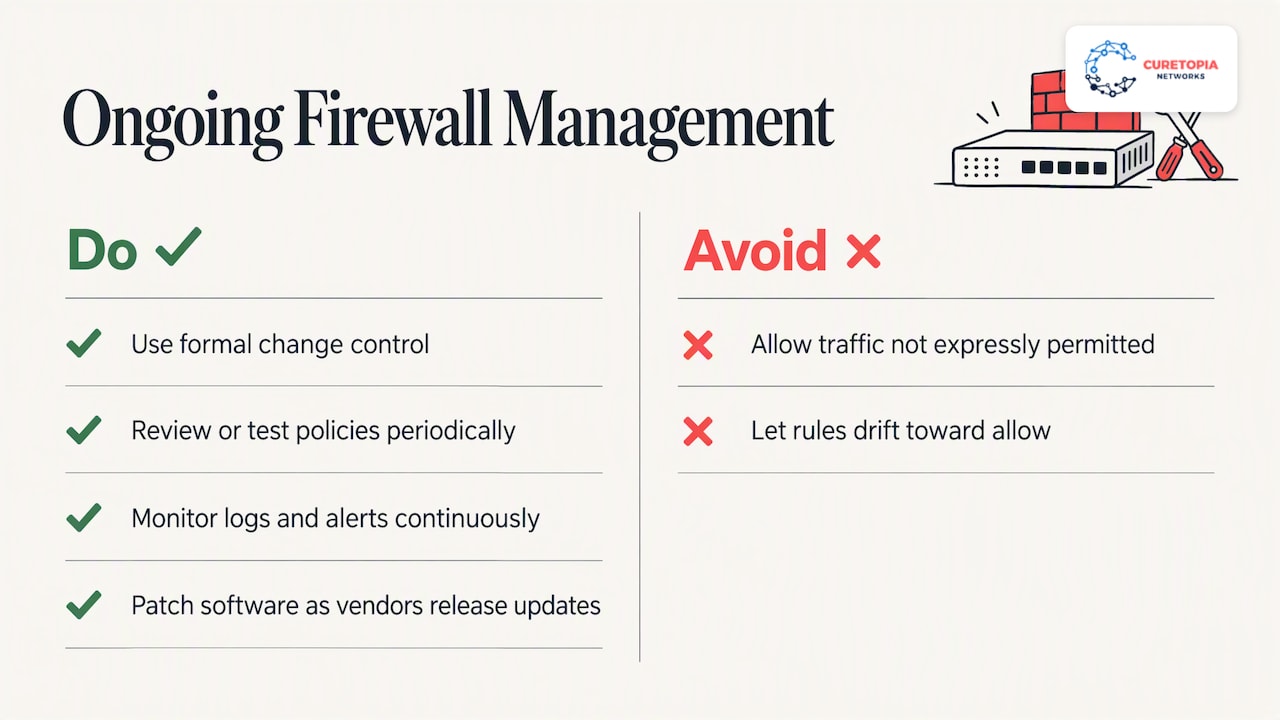
Buying a good firewall is the easy part. Keeping it effective is where networks fail. NIST’s guidance says that firewall rulesets and policies should be changed through a formal change-control process and reviewed or tested periodically, that logs and alerts should be monitored continuously, and that firewall software should be patched as vendors release updates. That is a short description of a lot of recurring work.
The same guidance says policies should generally block inbound and outbound traffic that is not expressly permitted. That is the “deny by default” approach. It sounds simple, but it only stays true if every new request is handled deliberately. Left alone, a rule base drifts toward “allow” because that is what makes the phone stop ringing.
The drift problem
Here is how it usually happens in a small organization:
- A software vendor needs remote access for a week. Someone opens a port.
- The week ends. Nobody closes the port, because nobody wrote down why it was opened.
- An employee leaves who knew the firewall. The login is on a sticky note or in one person’s head.
- The firmware falls two years behind because the update might cause an outage and there is no maintenance window.
- A scan or an incident finds the open port, and the cleanup begins from zero.
None of those steps is dramatic. Together they are the reason managed firewall support exists.
What a good service includes, in writing
When you compare providers, ask for the scope as a document, not a sales conversation. Here is a practical checklist.
| Area | What to expect | Question to ask |
|---|---|---|
| Change management | Requests logged, reviewed, approved and documented before and after implementation | Who can request changes, and who approves them? |
| Monitoring | Logs and alerts watched continuously, with defined severity levels | Who looks at alerts after hours, and how fast do they respond? |
| Patching | Firmware updates scheduled, tested and applied in agreed windows | How do you handle a critical vulnerability between windows? |
| Rule review | Scheduled review of every rule, with removal of stale ones | How often, and will I see the results? |
| Configuration backup | Current backup stored off the device | How long to restore to a replacement unit? |
| Remote access and VPN | Policy for who connects and how | Do you enforce multi-factor authentication for remote users? |
| Reporting | Regular summary of events, changes and recommendations | Can I see a sample report? |
| Ownership | You own the device, the configuration and the documentation | What do I get if we part ways? |
That last row matters. A provider who holds your configuration hostage is not managing your firewall, they are renting you a dependency.
How rules, alerts and updates are handled day to day
Rules and policies
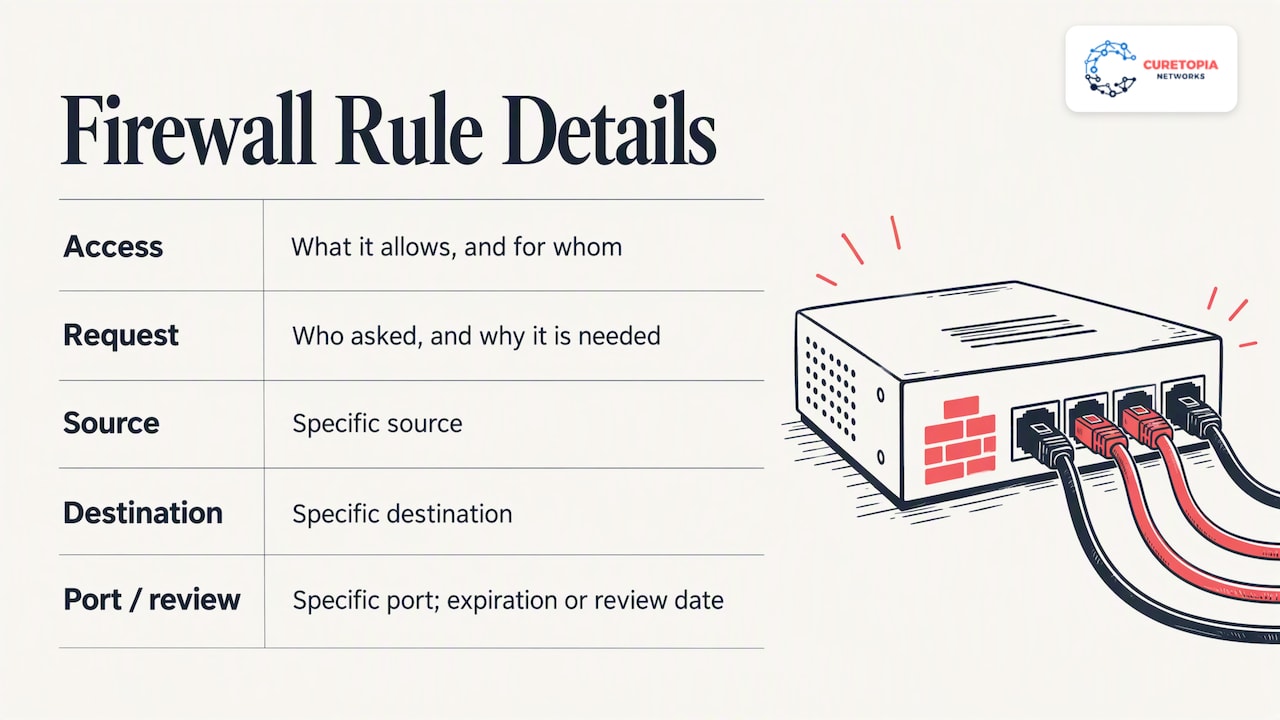
A good rule base is small, named and justified. Each rule should say what it allows, for whom, why and who asked for it. When a business owner says “our accounting software needs to talk to the vendor’s server,” the technician should translate that into the narrowest possible rule: specific source, specific destination, specific port, and an expiration or review date where it makes sense.
Monitoring and alerts
Logs are only useful if someone reads them. Continuous monitoring means alerts are filtered, ranked and acted on. Blocked scans from the internet are background noise. A workstation suddenly sending large volumes of data to an unfamiliar country is not. A managed service should separate the two and tell you only what needs attention.
Patching and firmware
Firewalls are internet-facing devices, which makes them attractive targets. Delayed updates are a standard way in. Management means patches are tracked against vendor advisories, tested where possible, and applied during agreed maintenance windows so the update itself does not surprise your staff in the middle of a workday.
Periodic review
Twice a year is a reasonable starting point for many small organizations, and more often if your environment changes quickly. The review asks four questions of every rule: is it still needed, is it still scoped correctly, is it documented, and does it match your current risk?
Physical and network security work together
A firewall protects the network, but your risk does not stop at the network edge. The server closet, the wiring and the front door matter too, and a layered approach pairs a well-managed firewall with alarm and access control systems that protect the building itself. If anyone can walk up to your network gear, the best ruleset in the world will not help.
When firewall management makes sense, and when it does not
NIST advises that firewall requirements start with risk analysis: identify what traffic your organization needs and how it must be secured. The FFIEC’s guidance on managed security service providers takes a similar approach to the buying decision. It tells organizations to assess their risks, identify the systems and sensitive data involved, and weigh providers’ experience, staffing, controls and reporting, along with the costs of procuring, operating and managing the service.
Translated into plain business terms, outsourcing firewall management is a strong fit when:
- You have no dedicated network or security engineer, or only one person who is a single point of failure.
- Your firewall has not had a documented rule review in over a year.
- You handle sensitive client data, such as financial, health or personal information, and must show customers or auditors that you control your network.
- You have several offices, remote workers or vendors connecting in, so the rule base keeps changing.
- You have had an incident, a failed audit or a cyber insurance questionnaire that exposed gaps.
It is a weaker fit when you already have a capable in-house team that wants to keep full control. In that case, a co-managed arrangement, where an outside team handles monitoring, patching and after-hours coverage while your staff handle day-to-day decisions, often works better than a full handoff.
What outsourcing does not do
Be honest with yourself about limits.
- You keep the accountability. The FFIEC states that financial institutions cannot outsource accountability and should maintain oversight of their provider relationships. The principle applies well beyond banks. If a rule is wrong, your customers will not care who typed it.
- A firewall is one layer. It does not stop a phishing email that tricks an employee into entering a password, a compromised laptop at a coffee shop, or a misconfigured cloud account. Email security, endpoint protection, multi-factor authentication, backups and staff training all sit alongside it.
- The provider needs your input. They cannot know a new application is going live unless someone tells them. Good providers build that into a simple request process.
- Visibility is your right. If you cannot see reports, change history or the current ruleset, you cannot oversee the work.
How to evaluate a provider
Use the same criteria the FFIEC lists, translated for a business buyer: experience, staffing, control environment, reporting and ability to meet agreed service levels.
- Ask about experience with your firewall brand and your type of business. A team that has managed networks for accounting firms, nonprofits or manufacturers understands the compliance and operational pressures you face.
- Ask who actually touches your firewall. Is it a named team, or a rotating queue?
- Ask for a sample report and a sample change record. You are looking for plain-language summaries, not a wall of log lines.
- Ask what happens in the first 90 days. A serious provider starts with an audit and cleanup of existing rules, not just monitoring of a messy configuration.
- Ask about response and escalation. What counts as critical, how fast do they respond, and how do you reach a person?
- Ask about exit terms. You should be able to leave with your configuration, documentation and credentials.
- Ask how the service fits the rest of your IT. A firewall that is managed in isolation from your Microsoft 365 setup, backups and endpoints leaves seams between teams.
Our perspective
We see the same pattern when a new client calls us. The firewall itself is usually fine. What is missing is ownership. Nobody can say who opened a given port, when the last update ran or what the alert emails actually mean. The business has been paying for hardware and getting very little protection from the way it is run.
That is why we do not treat firewall management as a standalone product. We manage IT as an integrated environment: the firewall, the network behind it, the cloud services in front of it, the backups behind all of it and the people using it. When those pieces are managed by one accountable team, root causes get fixed instead of patched around. A slow VPN, a blocked application and a suspicious login are often connected, and one team can see that.
Our advice to any business leader in Central Indiana is simple. Insist on written scope, insist on seeing reports, and insist that your configuration stays yours. A provider who welcomes those requests is one worth talking to.
— Cameron
How Curetopia approaches firewall and network management
We manage firewalls as part of our network and infrastructure services for organizations in Indianapolis and across Central Indiana. That means the firewall is monitored, kept current and reviewed alongside your switches, wireless, internet circuits and remote access, rather than handled as a separate silo.
The firewall also connects directly to the rest of your security program. Our cybersecurity services cover the layers around it, and our managed IT services give you a single team accountable for day-to-day support. If you already have an internal IT person, co-managed IT lets us take on the monitoring, patching and after-hours coverage while your team keeps the decisions they want to own.
If you are not sure what shape your current firewall is in, a conversation with our team is the quickest way to find out. You can start from our Indianapolis managed IT page.
A simple first step: a firewall health check
You do not need a provider to begin. Gather these answers internally:
- What make, model and firmware version is your firewall, and is it still supported by the vendor?
- Who has administrator access, and are those accounts tied to named individuals with multi-factor authentication?
- How many rules exist, and can anyone explain each one?
- Which ports are open to the internet, and why?
- Where are logs stored, and does anyone read them?
- When was the configuration last backed up, and has a restore ever been tested?
- What outbound traffic is restricted? Many networks only filter inbound traffic.
If you cannot answer more than a couple of these, you have found the reason to bring in help. The answers also give any provider a head start and make their proposal far more specific to you.
FAQ
What is included in managed firewall support?
Typically it covers rule and policy changes under change control, continuous monitoring of logs and alerts, firmware patching, scheduled rule reviews, configuration backups and regular reporting. Some providers also include VPN and remote access management. Ask for the exact list in writing, since scope varies widely between providers.
Is a VPN a firewall?
No. A firewall filters traffic between networks based on rules, while a VPN creates an encrypted tunnel so remote users or offices can connect securely. They often run on the same device and work together, which is why remote access rules are part of firewall management.
Do I still need a firewall if my business runs mostly in the cloud?
Usually yes. Your office network, staff devices and internet connection still need protection, and a firewall controls what moves between them and the internet. Cloud services add their own settings to manage, so it is a matter of covering both sides, not choosing one.
Can I keep my own IT person and still use a managed firewall service?
Yes. Many organizations split the work: the outside team handles monitoring, patching, reporting and after-hours response, while the internal person approves changes and handles daily needs. This co-managed model keeps control with you and removes the single-point-of-failure risk.
How often should firewall rules be reviewed?
NIST says rulesets should be reviewed or tested periodically but does not set one schedule for everyone. Many small organizations review at least twice a year and after any major change, such as a new office, application or vendor connection.
Sources
- NIST SP 800-41 Revision 1: Guidelines on Firewalls and Firewall Policy
- FFIEC IT Examination Handbook, Appendix D: Managed Security Service Providers