IT Budget Planning: A Practical Guide for Business Owners
A good IT budget starts with your business goals, not last year’s invoices. List what technology your company needs to run and grow over the next 12 months. Rank those needs by risk and value. Price each one, add a reserve for surprises, and review the plan every quarter. This guide walks through that process in plain terms, so you can finish a first draft this month.
It is written for owners and operators of small and midsize businesses. That includes the person who also “handles IT” because nobody else does.
Curetopianetworks
Align IT Spending With Business Goals
Curetopia Networks provides managed IT and cybersecurity support to help Central Indiana businesses align technology with their goals.
Explore managed IT services
TL;DR
- Build the budget from business priorities and risk, then price it. Adding a few percent to last year’s lines is how budgets drift out of step with the business.
- Split spending into recurring costs (licenses, support, security, backup) and one-time costs (hardware, migrations, projects). Each behaves differently.
- Treat cybersecurity and recovery as risk management, not a shopping list of tools.
- Keep a reserve for the failures no plan predicts, and review the budget quarterly.
- If you have no in-house IT leader, a managed provider or a virtual CIO can own the roadmap behind the numbers.
Table of Contents
What an IT budget actually is
An IT budget is the plan for what you will spend on technology over a set period, usually a year, and where that money goes. NetSuite describes it as the total funding allocated to an organization’s technology needs, spread across the categories and departments that use them.
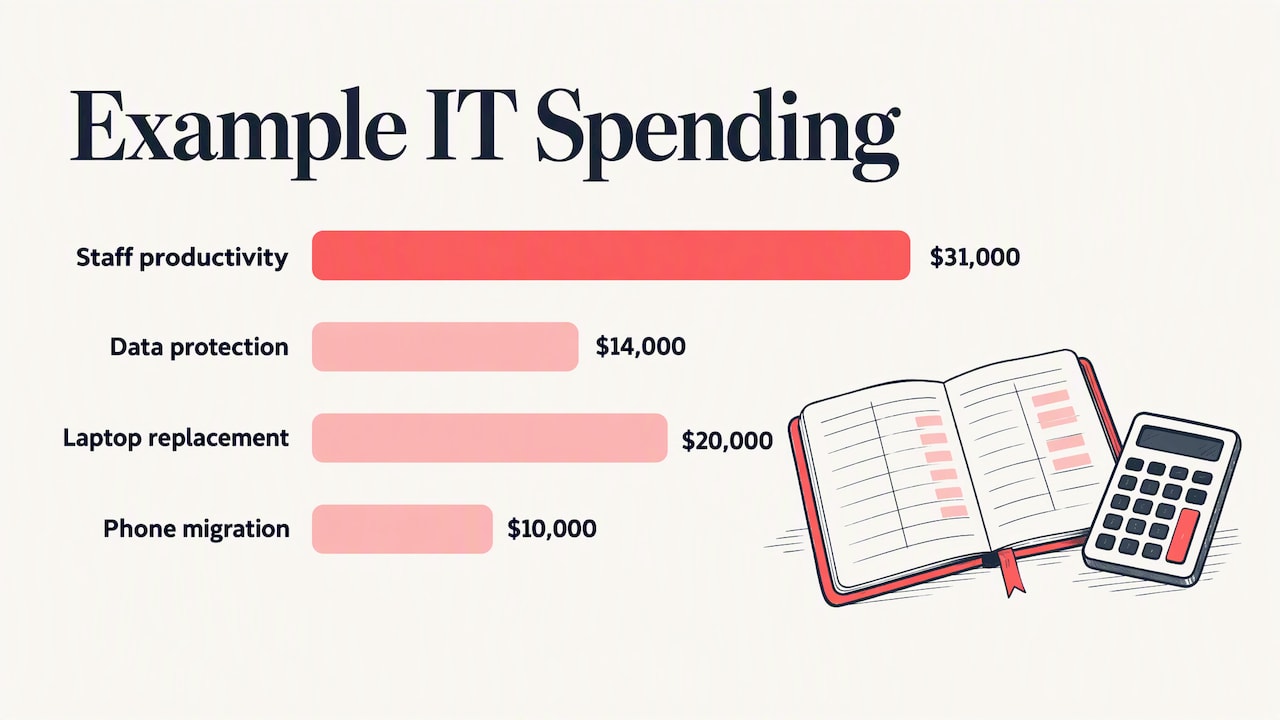
The number matters less than the logic behind it. A budget that says “$90,000” tells you nothing. A budget that says “$31,000 to keep 25 users productive, $14,000 to protect and recover data, $20,000 to replace aging laptops, $10,000 for a phone migration, and a reserve for the unexpected” tells you what you are buying and what you are not.
Technology is also a large line for most firms. One industry roundup estimates that US small and midsize businesses spent about $194 billion on technology products and services in 2024. Whatever your size, you are not spending in a vacuum, and the question is whether the money is chosen or simply accumulates.
Why last year’s budget plus 3% fails
Incremental budgeting is the default. You take last year’s lines, nudge them up, and move on. NetSuite’s guidance notes that this often leaves spending out of step with current needs, such as a cloud migration or stronger security for remote staff.
Three things usually go wrong:
- Hidden growth. Every new hire adds a license, a device, and a security seat. Subscription prices also tend to move on renewal.
- Hidden decay. Hardware you bought four or five years ago does not announce when it will fail. It just fails, on a busy Tuesday, at emergency prices.
- Hidden risk. If last year had no security line worth the name, “last year plus 3%” gives you the same exposure with a slightly bigger invoice.
A better method starts from what the business is trying to do. Gartner’s work on strategic IT budgeting makes a similar point: without a forward-looking plan, executives tend to see IT as a cost, not an investment.
Step by step: how to plan your IT budget
1. Take inventory of what you have
You cannot budget for what you cannot see. List every user, device, server, network component, software subscription, and cloud service. Note the owner, the renewal date, and the age of each item.
This is less daunting than it sounds. For very small businesses, federal small business security guidance says an information inventory can typically be done in a few hours by identifying where critical data lives and ranking it by importance to the business.
Watch for duplicates. Two file-sharing tools, three password managers, and a forgotten trial subscription are common finds, and each is a line you can cut.
2. Review what you actually spent
Pull 12 months of invoices and card statements. Sort them into categories (see the table below). Include the costs nobody labels as IT: the owner’s hours spent troubleshooting, the downtime when email went out, the consultant you called twice in a panic.
Those unlabeled costs are often the strongest argument for changing how you buy IT.
3. Define business priorities first
Ask what changes in the next 12 months. Are you hiring, opening a second office, moving to a new line-of-business application, taking on a client with stricter security requirements, or planning a merger? Each of those drives technology cost.
Write down three to five priorities. Every major line in the budget should trace back to one of them, or to keeping the lights on.
4. Rank by risk, not just by want
Security spending deserves its own pass. NIST’s small business guidance frames the work as a sequence: determine the value of your information, inventory the technology that touches it, and understand the threats, then use that to prioritize and focus security efforts. CISA’s primer for executives makes the same case: cybersecurity is about managing risk to the organization, not ticking off a requirements checklist.
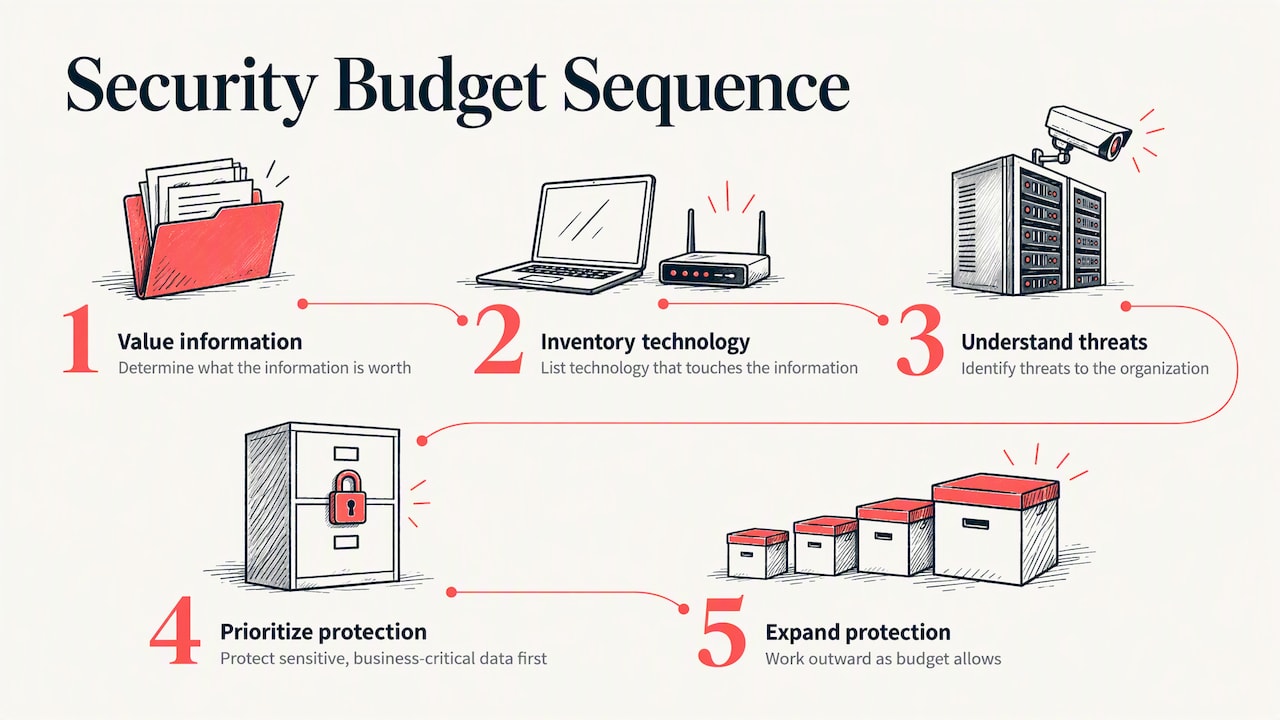
In budget terms, that means you do not try to buy every protection. You protect the most sensitive and most business-critical data first, then work outward as money allows.
5. Forecast needs and price them
For each priority, estimate cost with real quotes where you can. Separate:
- Recurring costs, which repeat monthly or annually: licenses, support, security tools, backup, internet.
- One-time costs, which happen once: hardware refreshes, migrations, cabling, a new firewall.
- Project costs, which have a start and an end: moving to a new platform, a compliance effort, an office move.
The Digital Transformation Hub’s budgeting guide comes with a template and explanations if you prefer to work in a spreadsheet. It is an Australian government resource, so treat its examples as structure, not as US pricing.
6. Add a reserve
Something will break or change. A reserve line, set aside as a percentage of the total that fits your risk tolerance, keeps one bad week from forcing you to raid another department’s budget. Agree on who can release it and for what.
7. Get finance and operations aligned early
NetSuite notes that proactive budgeting means finance and IT talking several months before the fiscal deadline. If your fiscal year starts in January, October is the time to begin. Showing the draft to the person who controls cash flow avoids a painful cut in December.
What belongs in an IT budget
Use this table as a starting checklist. The “how it behaves” column tells you how to forecast each line.
| Category |
Typical items |
How it behaves |
| Support and management |
Help desk, monitoring, patching, vendor management |
Recurring, scales with users and devices |
| Cloud and software |
Microsoft 365 or Google Workspace, line-of-business apps, SaaS tools |
Recurring, rises with headcount and renewals |
| Cybersecurity |
Email filtering, endpoint protection, MFA, training, security monitoring |
Recurring, plus periodic assessments |
| Backup and recovery |
Backup software, storage, recovery testing |
Recurring, grows with data volume |
| Hardware |
Laptops, desktops, servers, firewalls, switches, Wi-Fi |
One-time, on a replacement cycle |
| Connectivity |
Internet, phones, circuits |
Recurring, changes with locations |
| Projects |
Migrations, office moves, new systems |
One-time, tied to business priorities |
| Strategy and compliance |
Planning, audits, policy work |
Recurring or periodic |
| Reserve |
Unplanned failures, urgent changes |
Held back, not spent by default |
One published benchmark gives a sense of how the mix looks. A compilation of SMB data shows cloud services at about 38% of the typical small business IT budget, cybersecurity at 14%, and hardware at 13%, citing SMB Group’s 2025 figures. Use numbers like these as a sanity check only. Your mix depends on your industry, your data, and how much of your environment is already in the cloud.
A worked example
Imagine a 25-person professional services firm in Central Indiana. These numbers are illustrative, not a benchmark or a quote.
- Priority one: keep staff productive with fewer outages.
- Priority two: meet a client’s new security questionnaire.
- Priority three: replace eight laptops that are past their useful life.
The owner groups costs as follows: recurring support and cloud licenses first, then a security upgrade (multifactor authentication, email protection, staff training, tested backups), then a three-year laptop replacement schedule that spreads the eight machines across years instead of buying them at once, then a reserve.
The result is a plan that explains itself. When the owner is asked why security went up, the answer is the client questionnaire. When someone asks why laptops cost money this year, the answer is the replacement schedule. That traceability is the real value of the exercise.
Security and recovery: budget for the day it goes wrong
Most owners underbudget for recovery because it feels abstract. The question to ask is concrete: if your server room flooded or ransomware locked every file, how long could you operate, and what would that cost per day?
The federal small business guidance asks businesses to consider contingency and disaster recovery planning: what happens after a disaster such as a flood or tornado, or a contingency such as a power outage, and whether you have a plan to recover. Put a number on your answer. Then budget for backups that are tested, not merely running.
A useful rule: whatever the cost of a day of downtime is for your business, the budget for preventing and recovering from it should be proportionate. If you cannot estimate it, that is a sign to get an outside assessment.
Build, buy, or share: choosing how IT gets done
Budget planning is also where you decide who does the work. There are three common models.
| Model |
Fits when |
Budget shape |
| In-house only |
You have enough work and complexity to keep specialists busy |
Salaries, benefits, tools, training; hard to cover vacations and gaps |
| Fully managed provider |
You have no IT staff or want a single accountable partner |
Predictable recurring fee, plus projects |
| Co-managed |
You have an IT person or small team who needs backup and specialist depth |
Recurring fee for the shared pieces, plus internal salary |
None of these is right for everyone. The point is to pick on purpose and price it fully. A single in-house technician looks cheaper than a managed contract until you count vacation coverage, security tooling, training, and the day that person leaves.
Our perspective
We talk to business owners in Indianapolis and Central Indiana who have never had an IT budget. They have a pile of invoices, a few emergency calls, and a feeling that technology costs more than it should. In our experience, the problem is rarely the total. It is that spending has been reactive: a fix here, a purchase there, nobody looking at the whole environment.
That is why we manage IT as one integrated environment rather than as separate fixes. When one team is accountable for support, security, backup, and cloud, we can look for root causes, not repeat the same patch. Recurring problems become a line item you can eliminate, not a surprise you re-buy every quarter.
Our advice on budgets is simple. Start from the business, not the tool list. Decide what you most need to protect. Spread hardware cost across years. Keep a reserve. And make sure someone is responsible for the roadmap, whether that is an internal leader or a virtual CIO.
— Cameron
Common budgeting mistakes
- Budgeting only for tools. Software without the people or process to run it creates cost without protection.
- Ignoring the owner’s time. If you spend five hours a month fixing printers, that is a cost, even without an invoice.
- Skipping recovery testing. A backup you have never restored is a hope, not a plan.
- Buying hardware all at once. A single large refresh creates a cash spike and a cliff four years later.
- No renewal calendar. Auto-renewals at higher prices are an easy, avoidable leak.
- Treating the budget as a one-time document. Businesses change mid-year. A quarterly review keeps the plan honest.
A simple annual rhythm
- October to November: inventory, spend review, priorities.
- November to December: price projects, draft, review with finance.
- January: approve and publish the budget internally, with the renewal calendar.
- Each quarter: compare actuals with plan, adjust projects, and re-rank risks.
- Each year: repeat the inventory. It will be faster the second time.
Where a managed partner fits
If your company has no one who can own this roadmap, that is the gap we fill. Our vCIO and IT consulting service helps leadership connect technology plans to business goals. Our managed IT services cover day-to-day support under one accountable team, and our cybersecurity services address the risk-based priorities described above. If you already have an IT person, co-managed IT adds depth without replacing them.
Not sure where to begin? Our free IT assessment gives you a view of your current environment, which is the first input for any realistic budget.
FAQ
What should be included in an IT budget?
Include support, cloud and software subscriptions, cybersecurity, backup and recovery, hardware, connectivity, planned projects, and a reserve. Separate recurring from one-time costs so you can forecast each properly. Add compliance or client-driven security work if your industry requires it.
How do I plan an IT budget if I have never had one?
Start with an inventory of users, devices, and subscriptions, then pull the last 12 months of IT-related invoices. Group them into categories and list your top business priorities for the coming year. Price each need, add a reserve, and review quarterly.
How much of my budget should go to cybersecurity?
There is no single correct share. One compilation of SMB data puts cybersecurity at about 14% of the typical IT budget, but your data, industry, and client requirements matter more than an average. Rank your most sensitive information first and fund protection of that before anything else.
Should I hire an IT person or use a managed provider?
It depends on workload and complexity. A managed provider gives you a team and predictable recurring costs, while a hire gives you a dedicated person who knows your business. Many organizations combine the two through a co-managed arrangement.
Sources
Recommended
Made with BabyLoveGrowth, a backlink builder
Proactive IT Support: What It Is and How to Get It
Proactive IT support means someone watches, patches and plans your technology continuously, so problems are fixed before your staff notice them. Reactive support waits for a ticket. The proactive model treats your network, devices, cloud accounts and backups as one environment that needs steady maintenance, the way a building needs more than a repair call after the roof leaks.
If your IT help feels unreliable, your office network crawls every afternoon, or the same issues keep coming back, this guide explains what changes when support turns proactive, what it should include, and how to tell a real proactive provider from one that only uses the word.
Curetopianetworks
Make IT More Proactive
Curetopia Networks provides proactive IT support and cybersecurity for Indianapolis and Central Indiana organizations, helping reduce downtime and align technology with business goals.
Explore IT services
TL;DR
- Proactive IT support is continuous: monitoring, patching, backup checks, security controls and planning, not just answering tickets.
- It matters most for security. Attackers go after unpatched edge devices and stolen credentials, and small businesses are exposed.
- Slow networks and repeat outages are usually symptoms of a root cause nobody is paid to look for under break-fix.
- To improve weak IT support, baseline what you have, write down service levels, and standardize procedures.
- Ask any provider what they monitor, how fast they patch, what they report, and who is accountable.
Table of Contents
What proactive IT support actually means
The plain definition: your provider spends most of its effort on preventing incidents, not responding to them. Freshworks describes it as preventive maintenance for business technology, comparable to regular health check-ups. You do not wait for a server crash or a sluggish application before asking for help.
In practice, the shift is from incident-based work (fix this symptom) to continuous work (manage the infrastructure, audit configuration, plan capacity). That changes who carries the risk. Under break-fix, every outage is billable work for the provider and lost revenue for you. Under a proactive agreement, the provider’s incentive is a quiet environment.
Reactive, proactive and co-managed compared
|
Reactive (break-fix) |
Proactive (managed) |
Co-managed |
| Starts when |
Something breaks |
Continuously |
Continuously, shared with your in-house staff |
| Typical focus |
The symptom in front of the technician |
Root causes, patching, lifecycle, security |
Gaps your internal team cannot cover |
| Planning |
None |
Roadmap and budget |
Roadmap, with your team in the loop |
| Downtime |
Longer, because discovery comes late |
Shorter, because many issues are caught early |
Depends on how clearly roles are split |
| Best for |
Very small, low-risk setups |
Most organizations that depend on their systems |
Companies with an IT person or small team |
Neither extreme suits everyone. A company with one capable IT manager may not want to hand over everything, which is the case co-managed support exists for.
What a proactive service should include
Marketing pages all promise “24/7 monitoring.” Look for the specific components underneath it.
- Remote monitoring and management of servers, workstations and network gear, with alerts that someone actually acts on.
- Automated patch management, including firewalls, VPN appliances and other devices at the edge of your network, not only Windows laptops.
- Endpoint and identity security: endpoint detection and response, DNS filtering and multi-factor authentication.
- Backup and recovery that is tested, not just configured. A backup nobody has restored is a hope, not a control.
- Cloud administration for Microsoft 365 or Google Workspace, including licensing, access and configuration.
- Asset lifecycle management: knowing what you own, when warranties end and when hardware should be replaced.
- Strategic planning, often called vCIO work: a technology roadmap tied to budget and business goals.
- Regular reporting that shows what was found, what was fixed and what is still open.
If a proposal lists tools but no reporting and no named owner, you are looking at reactive support with a monitoring agent attached.
Why proactive matters for security
The strongest argument for proactive support is not convenience. It is breach risk.
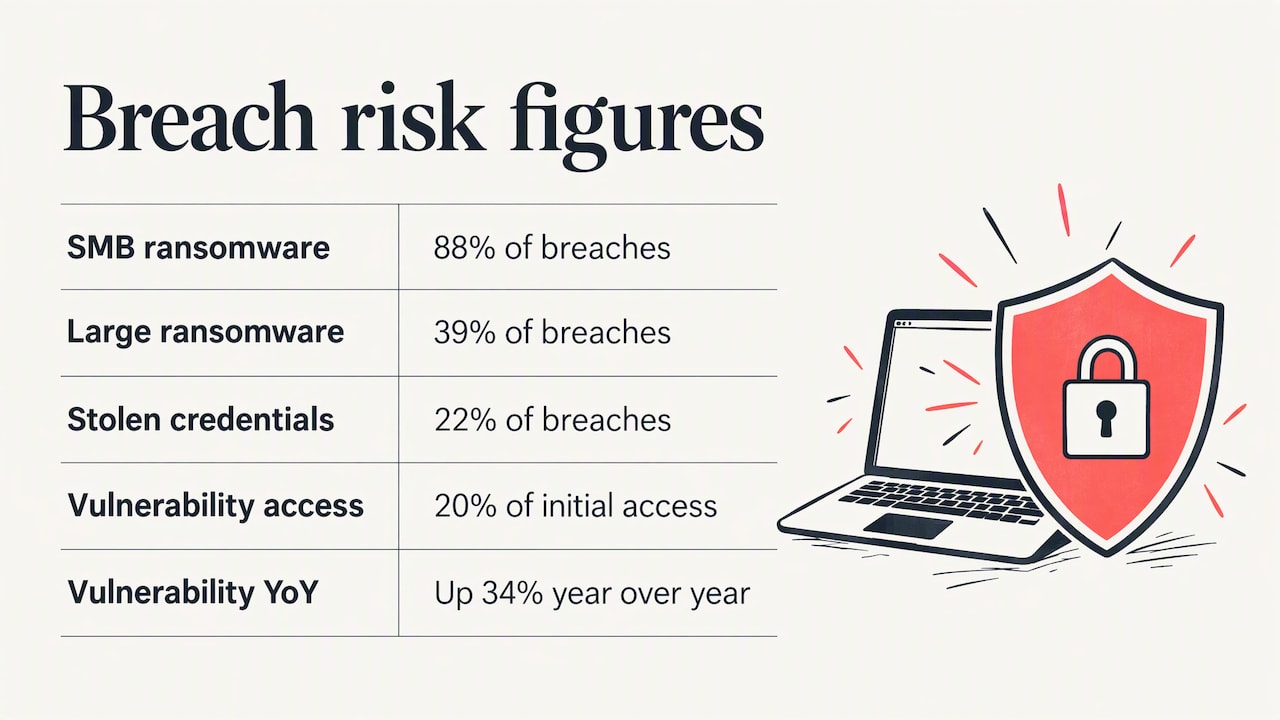
The 2025 Verizon Data Breach Investigations Report found that ransomware appeared in 88% of breaches at small and medium-sized businesses, versus 39% at larger enterprises. Smaller organizations tend to have slower patch cycles and thinner incident response, which makes them easier targets.
Two entry points stand out in the same report summary: stolen credentials, at 22% of breaches, and exploitation of vulnerabilities, at 20% of initial access and up 34% year over year. Both are things proactive work addresses directly. Multi-factor authentication blunts stolen passwords. Timely patching closes the vulnerabilities.
The edge device blind spot
Many businesses assume they are covered because someone “handles IT.” The firewall and VPN are often the forgotten pieces. SecurityWeek’s coverage of the report notes that only 54% of vulnerable edge device issues were fully remediated, with a median of 32 days to fix them. That is a month in which an internet-facing device stays exposed.
A proactive provider closes that window with a defined process: track vendor advisories, test updates, deploy on a schedule, and confirm. Government guidance points the same way. NIST’s bulletin on patching says a systematic approach to managing software patches helps organizations improve security cost-effectively.
Unmanaged devices and phishing
Personal phones and laptops used for work create another gap. The Verizon findings, as summarized by Keepnet, say 46% of devices tied to corporate credentials in infostealer logs were unmanaged. Proactive support includes an inventory of what connects to your systems and policies for what is allowed.
For email threats, CISA’s phishing guidance lays out mitigations aligned with the Cross-Sector Cybersecurity Performance Goals developed with NIST. Those are worth asking your provider to map against.
Slow office network? Start with root causes
A slow network is one of the most common reasons a business starts looking for better IT support. Under break-fix, it goes like this: staff complain, someone reboots the router, speed returns for a day, and the cycle repeats.
A proactive approach asks different questions:
- Is the firewall or switch running outdated firmware or an overloaded configuration?
- Is bandwidth being consumed by cloud backups or large file syncs during business hours?
- Is Wi-Fi coverage designed for the number of devices now on it?
- Are failing cables, aging switches or a saturated internet circuit the real culprit?
- Does monitoring show a pattern, such as slowdowns at the same time each day?
Monitoring data turns “the network feels slow” into a trend you can act on. That is why network and firewall management sits inside a proactive program, not beside it. Our network and infrastructure service is built around that idea: manage the environment so performance problems show up in dashboards before they show up in complaints.
Signs your current IT support is unreliable
Unreliable support rarely fails dramatically. It erodes. Watch for these patterns:
- The same problems return after being “fixed.”
- You learn about outages from employees, not from your provider.
- Nobody can tell you the age of your hardware or when licenses renew.
- Patching happens “when we get to it.”
- You cannot name the person responsible for your overall IT outcome.
- Reports, if any, list tickets closed and nothing about risk.
- Your backups have never been test-restored.
- Security questions from insurers or clients leave you scrambling.
If three or more apply, the problem is probably the model, not the individual technician.
How to improve IT support, step by step
You do not have to switch providers to start improving. These steps work for an internal team or an outside partner. They follow the pattern laid out in InvGate’s guide to improving IT support, which stresses baselining performance, setting clear service levels and standardizing procedures.
1. Baseline what you have
List your devices, servers, network equipment, cloud tenants and key applications. Record ticket volume, common issue types and how long fixes take. You cannot improve what you have not measured.
2. Set service levels in writing
Define response and resolution targets by priority. An outage that stops invoicing is not the same as a request for a new monitor. Write the difference down and hold your provider to it.
3. Standardize the routine work
Onboarding a new hire, resetting access, replacing a laptop: each should follow a documented procedure. Standard procedures cut errors and make support predictable no matter who answers the phone.
4. Fix the recurring issues
Pull the last six months of tickets and group them. The top three repeat causes usually point to a configuration, a failing device or a training gap. Fix those and ticket volume drops.
5. Turn on prevention
Add monitoring, automated patching, multi-factor authentication and tested backups. This is the step that makes support proactive.
6. Review monthly
A short monthly review of open risks, upcoming renewals and project priorities keeps IT connected to business decisions.
How to judge a proactive provider
Ask these questions in any sales conversation and compare the answers:
| Question |
A strong answer sounds like |
| What do you monitor? |
Servers, endpoints, firewalls, switches, cloud services, and backups, with named alerting |
| How do you patch edge devices? |
A defined schedule and verification process, not “as needed” |
| What will I see each month? |
A report on incidents, patch status, security findings and roadmap items |
| Who is accountable for my environment? |
A named person or team, with a regular review |
| How do you test backups? |
Scheduled restore tests with results shared |
| What happens with my in-house IT person? |
A clear split of duties, or a full takeover, as you prefer |
| How do you plan for growth? |
A technology roadmap tied to budget |
Be cautious of long auto-renewing contracts with vague scope, and of providers who cannot explain their security stack in plain language.
Our perspective
Most of the businesses we meet in Indianapolis and Central Indiana are not suffering from a lack of tools. They are suffering from a lack of ownership. They have a firewall from one vendor, Microsoft 365 set up by another, backups configured years ago by someone who left, and nobody looking at the whole picture. When something breaks, each piece gets patched in isolation and the real cause stays put.
That is why we manage IT as one integrated environment: support, security, cloud, network and planning under one accountable team. We aim to diagnose and resolve root causes instead of applying ad-hoc fixes, because the cheapest ticket is the one that never gets opened.
We also think proactive support should be easy to verify. You should be able to see what is monitored, what was patched, what is at risk and what the plan is for next year. If your provider cannot show you that, ask why.
— Cameron
Where Curetopia fits
If you want proactive IT support without building an internal department, our managed IT services cover day-to-day support, monitoring and accountability for organizations across Central Indiana. Security sits alongside it through our cybersecurity services, and our vCIO and IT consulting turns the technology roadmap into a plan you can budget for.
Already have an IT person or team? Our co-managed IT services add depth and coverage to your staff instead of replacing them. Backup is handled through backup and disaster recovery. We do not publish prices, so the first step is a conversation about your environment. You can start from our Indianapolis managed IT page.
Common objections
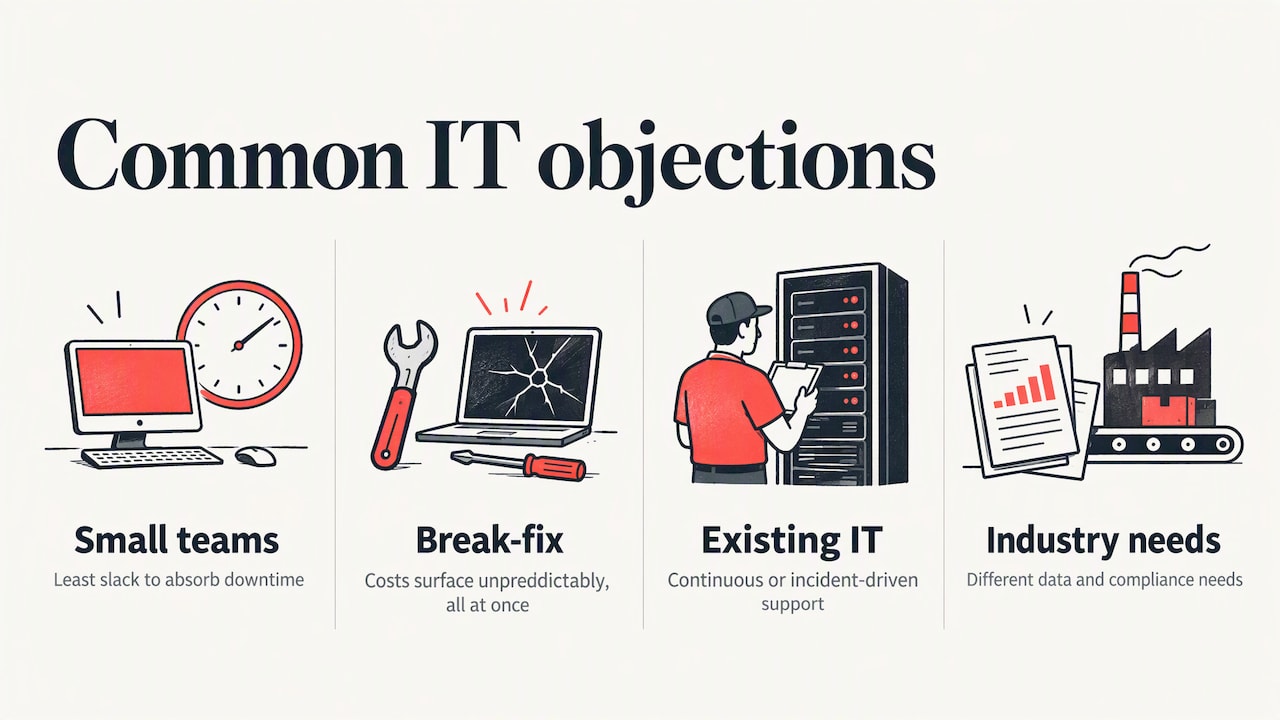
“We are too small for this.” The breach data suggests the opposite. Smaller organizations face a disproportionate ransomware share in the Verizon findings cited above, and they have the least slack to absorb downtime.
“Break-fix is cheaper.” It can look cheaper month to month, until an outage, a ransomware event or a failed restore. The costs of reactive support show up unpredictably and all at once.
“We already have IT support.” Good. The question is whether it is continuous or incident-driven. Run through the unreliable-support signs above and judge honestly.
“Our industry has special requirements.” Many do. Accounting firms, nonprofits and manufacturers have different data and compliance needs, which is why we keep dedicated pages for accounting and CPA firms and nonprofits.
FAQ
What is proactive IT support?
It is IT support that prevents problems instead of waiting for them. A provider monitors systems, applies patches, tests backups, manages security controls and plans upgrades on an ongoing basis. The goal is fewer outages and fewer surprises.
What is the difference between proactive and reactive IT support?
Reactive support, also called break-fix, starts when something fails and ends when it is fixed. Proactive support runs continuously and focuses on root causes, patching and lifecycle management. Reactive models usually mean longer downtime because issues are found late.
How do I improve IT support in my company?
Baseline your current environment and ticket history, set written service levels, standardize common procedures and fix the top recurring issues. Then add prevention: monitoring, automated patching, multi-factor authentication and tested backups. Review results monthly.
Why is my office network slow?
Common causes include outdated or overloaded network equipment, poor Wi-Fi design, bandwidth used by backups or cloud syncs, and a saturated internet connection. Monitoring over time shows the pattern. A rebooted router fixes the symptom for a day, not the cause.
Does proactive IT support replace my in-house IT person?
Not necessarily. Some organizations hand over everything, while others use a co-managed arrangement where the provider covers monitoring, security and projects alongside internal staff. The right split depends on your team’s size and skills.
Sources
Recommended
Created with BabyLoveGrowth to write for search
Co-Managed IT Services: Is It the Right Fit for Your Team?
Imagine your in-house IT team is stretched thin, juggling daily tech issues while bigger projects keep getting pushed to the back burner. Sound familiar? You’re not alone, and the good news is there’s a solution that many businesses are turning to right now.
Enter co managed IT services, a flexible approach that pairs your existing IT staff with an external team of tech experts. Instead of replacing your team or going fully outsourced, you get the best of both worlds. Think of it as bringing in a reliable support system that works alongside your people, filling in the gaps where you need it most.
But is it actually the right fit for your business? That’s exactly what we’re here to help you figure out. In this post, we’ll break down what co managed IT services really means, how it compares to other IT support options, and the key questions you should ask before making a decision. No confusing tech jargon, just a straightforward guide to help you choose what works best for your team.
What Co-Managed IT Services Actually Are (No Jargon, Promise)
Let’s break this down in the simplest way possible, because “co-managed IT services” sounds way more complicated than it actually is.
Here’s the core idea: you already have an internal IT person (or a small team), and they’re doing a great job. Co-managed IT doesn’t replace them. Instead, it brings in an external IT partner, called a Managed Service Provider or MSP, to work alongside your existing team. Your IT person stays right where they are. They just get serious backup.
Think of it like hiring a specialist consultant who becomes a genuine part of your team on an ongoing basis, rather than a one-time vendor you call in a panic when something breaks. According to What is Co-Managed IT? Complete Guide for 2026, the model works through a clear responsibility split, where your internal team owns things like strategy, vendor relationships, and big-picture planning, while the MSP handles the gaps: 24/7 monitoring, cybersecurity operations, Microsoft 365 management, helpdesk overflow, and after-hours coverage.
That gap-filling piece matters more than most people realize. One IT generalist simply cannot be an expert in cloud infrastructure, cybersecurity, compliance, AND be available at 2 AM when something goes wrong. Co-managed IT solves that problem structurally.
Now, it’s worth knowing how this compares to a couple of other options you may have heard about. Fully managed IT is different: that’s where an MSP takes over all IT responsibilities, usually because a business has no internal IT staff at all. When Are Co-Managed IT Services a Good Fit? describes co-managed IT as designed specifically to complement and enhance your existing team, not replace it.
Break-fix or reactive IT support is also very different. That’s the “call someone when something breaks” model. Co-managed IT is proactive and always-on, meaning problems get caught and prevented before they ever interrupt your business day.
Does This Sound Like Your Business?
Picture this: you run a 50-person company and you have one solid IT person on your team. They are great at the day-to-day stuff, keeping helpdesk tickets moving, setting up new laptops, resetting passwords, and making sure everyone can actually get their work done. But the moment something bigger shows up, a security incident, a cloud migration question, or a compliance requirement, things get shaky fast. That one person is doing their best, but they were never hired to be a cybersecurity analyst, a cloud architect, and a compliance specialist all at once.
Here is the honest reality: advanced cybersecurity monitoring, private cloud management, and compliance documentation are completely different skill sets from general IT support. Expecting one generalist to cover all of it is a bit like asking your family doctor to also perform surgery. The goodwill is there, but the depth of expertise just is not.
You have probably looked at hiring a second IT employee to fill those gaps. But when you run the numbers on salary, benefits, recruiting fees, and ongoing training, it is hard to justify that investment for needs that are specific and do not require a full-time presence every single day.
And if you are managing both Google Workspace and Microsoft 365 across your team, you already know how quickly that becomes a headache. Two separate admin consoles, different security settings, different update cycles, it adds up.
The good news? You do not have to hand over all of IT to solve this. Learn more about how the co-managed model compares to fully managed support to see exactly where the line is drawn.
Co-Managed IT vs. Hiring In-House vs. Full Outsourcing
So you are weighing your options, and it really comes down to three paths: hire another IT person, hand everything off to a managed IT provider, or go the co-managed route. Let’s break each one down honestly so you can see which actually makes sense for where your business is right now.
Hiring a Second In-House IT Person
This feels like the obvious move when your one IT person is drowning. But the numbers tell a different story. Salary alone runs $65,000 to $90,000 per year for a solid IT hire, and that is before you factor in benefits (typically another 30% on top), equipment, onboarding time, and ongoing training. According to a cost comparison of managed IT versus in-house IT, the true all-in cost per in-house IT employee lands between $92,500 and $133,500 annually. And here is the kicker: that budget still only buys you one generalist skill set. If you need deep cybersecurity expertise or cloud architecture support, a general IT hire simply will not cover it. There are currently 4.8 million unfilled cybersecurity positions globally, which means specialized talent is genuinely hard to find and even harder to keep.
Full Outsourcing: Great for Some, Not for Everyone
A fully managed IT provider works beautifully if you have zero internal IT staff and need a complete solution from day one. But if you already have an IT person on your team, full outsourcing creates a messy overlap. You end up paying for services your existing employee already handles, which is just wasted budget. Worse, full outsourcing can strip away the institutional knowledge your internal person carries: the undocumented vendor contacts, the quirky server configuration nobody else knows about, the relationships with your software reps. That context is genuinely valuable and not easy to replace.
Why Co-Managed IT Hits the Sweet Spot
Co-managed IT sidesteps both problems entirely. Rather than replacing your internal person, it layers specialized expertise on top of them. You can start with cybersecurity coverage, then add virtual desktop management or Microsoft 365 administration as your needs grow. Nothing gets bundled that you do not actually need. And with outcome-based pricing becoming the standard in 2026, you pay for defined results and coverage levels, not hours logged. That makes the ROI far easier to track than a traditional IT contract, which is something your finance team will genuinely appreciate.
The Specific Gaps a Co-Managed IT Partner Can Fill
Now that you know how co-managed IT stacks up against your other options, let’s get specific. Because knowing what gaps exist is what actually helps you decide whether this model makes sense for your business.
Cybersecurity Is Almost Always Gap Number One
This one comes up constantly, and for good reason. According to industry research, 76% of SMB clients say security is their top concern, yet most internal IT generalists are stretched too thin to run 24/7 threat monitoring, endpoint detection, and incident response all at once. That is not a knock on your IT person. It is just the reality that cybersecurity has become its own specialized discipline. A co-managed partner brings dedicated security tools and trained eyes watching for threats around the clock, filling a gap that a single generalist simply cannot cover alone.
Cloud and Virtual Desktop Management
Private cloud environments and virtual desktops are not set-it-and-forget-it technology. They require ongoing performance monitoring, regular provisioning updates, and fast troubleshooting when something goes sideways. The platforms change constantly, and keeping up is practically a full-time job on its own. At Curetopia Networks, this is exactly the kind of work we handle so your internal IT person is not stuck learning on the job while your team waits on a fix.
Microsoft 365 and Google Workspace Go Deeper Than You Think
Most businesses use only a fraction of what these platforms can do, and that creates real risk. Co-managed IT strengthens internal teams by adding specialist knowledge for conditional access policies, email security configurations, compliance archiving, and license management. These are not basic tasks. Getting them wrong can expose your business to data loss or compliance issues.
After-Hours Coverage and Strategic Planning
Think about the last time something broke on a Friday evening. A co-managed arrangement means someone is always monitoring your environment, even when your internal team is offline. Beyond coverage, a dedicated co-managed partner also brings strategic IT planning to the table, helping you build an infrastructure roadmap, evaluate new tools, and keep your technology growing alongside your business rather than falling behind it.
Who Handles Security in a Co-Managed Setup?
Security in a co-managed setup is not one team’s job. It is shared between your internal IT person and your MSP partner, with each side owning specific tasks based on what they are best positioned to handle. Think of it less like a handoff and more like a relay race where both runners are always on the track.
What Your Internal Team Owns vs. What the MSP Covers
Your internal IT person typically stays close to the day-to-day stuff: managing endpoints, provisioning new user accounts, handling immediate on-site issues, and applying their institutional knowledge of how your business actually runs. The MSP brings the heavier security firepower, covering 24/7 threat monitoring, patch management, vulnerability scanning, and incident response protocols. These are functions that require enterprise-grade tooling and dedicated specialists, which is exactly why most small and midsize businesses cannot realistically staff them internally.
The SLA Is Your Safety Net
Here is where a lot of businesses make a costly mistake. They assume that because an MSP is involved, security is “handled.” But without a written service-level agreement that clearly names who owns each security function, you end up with gaps that nobody is watching. A well-structured SLA eliminates that dangerous grey zone by spelling out accountability on both sides in plain terms.
When you are evaluating a co-managed IT partner, do not just take their word for it. According to research on the managed security services market, this space is growing from $39.47 billion in 2025 to a projected $66.83 billion by 2030, which tells you businesses are taking dedicated security coverage very seriously. Yet a striking number of MSPs market cybersecurity capabilities without holding any formal certifications to back them up. Ask your potential partner for documented proof of their security capabilities, specific tools they use, certifications they hold, and how they handle incident response. Marketing claims are easy; proof is what protects your business. You can also explore how co-managed security services typically layer SOC, MDR, and XDR functions to understand what a mature security stack should actually look like.
Tips for Vetting a Co-Managed IT Partner (Ask These Questions)
Picking the right co-managed IT partner is honestly one of the most important decisions you will make for your business, so it is worth slowing down and asking the right questions before signing anything. Here are five questions that will separate the credible providers from the ones just talking a big game.
Ask for documented credentials, not marketing language. Here is a wild stat: 96.6% of MSPs claim cybersecurity expertise, but only 9.2% actually hold SOC 2 attestation. That gap tells you everything. Do not accept a slick slide deck or a badge on their website. Ask them to produce audit reports, attestation letters, or formal certifications like SOC 2 Type II or ISO 27001. If they cannot hand over documentation, that is your answer right there. You can find a helpful breakdown of what to look for in this practical guide to choosing the right MSP partner.
Ask how they handle the handoff with your existing IT staff. A good co-managed partner will walk you through a clear, documented onboarding process before the contract is signed. If their answer sounds like “we will figure it out as we go,” that is a red flag. You want specifics: who owns escalation paths, which systems they access versus what your team controls, and how knowledge gets transferred back to your internal staff after incidents are resolved. For more on what a solid onboarding conversation should look like, this questions-to-ask guide for co-managed IT is genuinely useful.
Ask about experience with the tools you already use. Generic IT knowledge is not the same as deep platform expertise. If your business runs on Microsoft 365, Google Workspace, or a private cloud environment, ask the provider to show you client references using that exact same stack. Broad IT experience does not automatically translate to knowing the specific quirks of your environment.
Ask how they measure and report results. In 2026, strong providers should hand you a sample monthly report before you commit. That report should include uptime metrics, mean time to resolution, active threat summaries, and coverage gaps, not just a list of tasks completed. A provider who cannot show you what reporting looks like now is unlikely to deliver it consistently later.
Ask whether they use AI-assisted monitoring and automation. MSPs deploying AI tools are reporting 40% faster resolution times, which directly affects how quickly issues get fixed before your business feels the impact. Ask them to name the specific tools in their monitoring stack, not just say “we use automation.” Specifics here signal that they are genuinely invested in faster, smarter service delivery.
What Onboarding Actually Looks Like (Your IT Person Will Thank You)
Here is something worth knowing right away: your internal IT person is probably going to love this arrangement once they settle in. The biggest fear most business owners have going into co-managed IT is that their existing tech person will feel replaced or pushed aside. But in reality, the opposite tends to happen. Your IT person gets to hand off the tasks they dread, like repetitive monitoring, patch management, and drowning in helpdesk tickets, so they can finally focus on the projects they actually care about. Think of it as giving them breathing room instead of competition.
The onboarding process itself kicks off with a discovery phase. Your co-managed partner comes in, audits your current environment, maps out your tools and infrastructure, and gets a clear picture of where the gaps are. Nothing gets assumed, everything gets documented. This step is non-negotiable with any reputable provider because skipping it creates confusion and security blind spots down the road.
From there, both sides sit down and put responsibilities in writing. Your internal team and the MSP agree on exactly who handles what, from patch deployment to incident response to user provisioning. This written role clarity prevents that awkward situation where two people are working on the same problem or, worse, nobody is working on it at all.
Then comes the ramp-up window. Expect roughly two to four weeks before everything runs like clockwork. Tools need to be deployed, workflows need to be adjusted, and both teams need to find their rhythm together. A good provider will tell you this upfront rather than promising instant results.
After onboarding, regular check-ins between your internal IT staff and the co-managed team keep things on track. As your business grows and your needs shift, those conversations make sure coverage evolves right along with you.
Is Co-Managed IT Right for You? Here Is How to Decide
If you have at least one internal IT person but keep running into the same frustrating gaps, co-managed IT is almost certainly worth a conversation. The quickest way to figure out if it fits is to grab a notepad and write down your top three IT headaches right now. Be honest. If anything on that list involves cybersecurity, cloud management, Microsoft 365, or getting someone on the phone after 5pm, those are precisely the areas a co-managed partner is built to handle.
It is also worth doing a quick cost comparison before assuming hiring is the answer. A second full-time IT employee comes with salary, benefits, recruiting time, and a 30 to 90 day ramp-up period, and there is a real chance they still would not cover every specialized gap your business needs. Co-managed IT gives you a whole team of specialists at a fraction of that cost.
When you do start talking to providers, ask for documented credentials, a clear onboarding plan, and a written breakdown of exactly who owns what on the security side before you commit to anything.
At Curetopia Networks, we work alongside your existing team to fill in whatever gaps are slowing you down, whether that is cybersecurity, private cloud, virtual desktops, or Microsoft 365 support. Reach out anytime for a no-pressure conversation.
Conclusion
Co-managed IT services offer a powerful middle ground for teams that need more support without losing control. Here are the key takeaways to keep in mind:
- Your in-house team stays in place, now backed by expert resources
- Gaps in coverage, skills, or capacity get filled strategically
- You maintain flexibility to scale support up or down as your needs change
- The result is a stronger, more resilient IT operation overall
If your team is constantly playing catch-up, it may be time to explore what co-managed IT can do for you. Start by auditing your current pain points and asking potential partners the right questions.
The right fit is out there. With the right support structure in place, your IT team can finally stop putting out fires and start driving real progress for your business.
7 Things Your Business IT Support Should Actually Be Doing
Picture this: your computer crashes right before an important client meeting, you frantically call your IT support team, and… you get voicemail. Sound familiar? If so, you might not be getting the level of service your business actually deserves.
A lot of small business owners assume that business IT support just means having someone to call when things break. But the truth is, a good IT support team should be doing so much more than playing fix-it whenever something goes wrong. They should be actively working behind the scenes to keep your business running smoothly, securely, and efficiently every single day.
Whether you just hired your first IT provider or you’re starting to wonder if your current one is pulling their weight, this post is for you. We’re breaking down seven things your business IT support should genuinely be doing on your behalf. Some of these might surprise you, and others might make you realize it’s time to have a serious conversation with your provider. Let’s dive in!
Why the Break-Fix Model Is Holding Your Business Back
Let’s be honest, most small businesses stumble into the same IT trap without even realizing it. Something breaks, you call someone to fix it, pay the bill, and get back to work. Until the next thing breaks. Then you repeat the whole process. That’s the break-fix cycle in a nutshell, and it feels normal until you start adding up what it’s actually costing you.
Here’s the thing though: in 2026, the break-fix approach isn’t just inconvenient. For businesses with 10 to 150 employees, it’s arguably the biggest obstacle to growth, bigger than budget constraints, bigger than hiring challenges. When your team can’t work because a server is down or your email is broken, you’re not just losing hours. You’re losing money fast. Research shows IT downtime can cost small businesses around $427 per minute, and even a short two-hour outage at that rate turns into a staggering loss.
The unpredictability is another killer. Break-fix rates typically run between $100 and $250 per hour, with emergency and after-hours calls running even higher. There’s no flat fee, no forecast, and no budget certainty. For a growing business without a dedicated IT leader, every outage pulls a senior employee away from revenue-generating work just to manage the chaos.
The real shift happens when you stop thinking about business IT support as a repair service and start seeing it as a proactive growth partner. Modern managed IT services for small businesses focus on preventing problems before they happen, keeping your systems monitored around the clock, and actually helping you plan for where your business is headed. That’s not a repair shop. That’s a strategic advantage.
1. Catching Problems Before You Even Notice Them
Here is where business IT support starts to get really exciting. Instead of waiting for things to go wrong, a good managed IT provider is quietly watching your systems around the clock, every single day, including weekends and holidays. Think of it like having a security guard who never sleeps, except instead of watching doors, they are watching your servers, devices, and network connections.
This is made possible through tools called Remote Monitoring and Management (RMM) software. These tools install a lightweight agent on your devices and continuously collect data on things like CPU usage, disk space, network performance, and security status. If something starts looking suspicious or unhealthy, your IT team gets an alert right away. According to proactive IT management research, businesses that switch to proactive monitoring see dramatically fewer unplanned outages compared to those still running on reactive support.
Here is a quick comparison that really puts things in perspective. A technician spending 20 minutes remotely clearing a nearly full server drive at 2am costs almost nothing in comparison to a half-day outage that brings your whole team to a standstill. Lost productivity, frustrated customers, and damaged trust can all follow a single preventable failure.
The best part? Your managed IT provider can set up automated alert thresholds so that when a problem crosses a certain level, a fix is triggered automatically, no human needed. Small hiccups get handled quietly in the background. You can learn more about how RMM tools support small businesses and why this proactive approach is becoming the new standard for smart business IT support.
Here is a fun challenge: ask your current IT provider when they last caught and fixed something before you even noticed it. If they cannot answer that question, it might be time for a conversation.
2. Actually Protecting You from Cyber Threats
Here is something that might surprise you: small businesses are actually more targeted by cybercriminals than large corporations. That is not a typo. Attackers go after smaller companies on purpose because they assume the defenses are weaker and easier to break through. In fact, SMB cybersecurity statistics for 2026 show that 43% of all cyberattacks target small businesses, and ransomware appeared in a staggering 88% of SMB breaches. These are not random accidents. You are being targeted.
The three biggest threats hitting small businesses right now are phishing emails, ransomware, and credential theft. Phishing alone generated nearly 73,000 FBI complaints in 2025, making it the most reported cybercrime by volume. Ransomware recovery costs for small teams can average over $600,000 when you factor in downtime and lost data. And stolen passwords? They were the number one hacking method used against SMBs. If your team reuses passwords or skips multi-factor authentication, that is a wide open door.
This is exactly why solid business IT support includes layered security, not just one tool. Think of it like locking your front door, your back door, and your windows all at once. A proper setup includes endpoint protection on every device, email filtering to catch phishing attempts, multi-factor authentication on all accounts, and regular security audits to spot gaps before attackers do.
Here is the part most people miss: cybersecurity is never a one-time setup. According to recent small business cybersecurity research, cyberattack incident rates climbed 53% year-over-year as AI-powered threats keep evolving. Threats change constantly, which means your defenses need ongoing patch management, 24/7 monitoring, and regular employee awareness training to stay current.
At Curetopia Networks, cybersecurity is not sold as an optional add-on. It is built directly into our managed IT service stack from day one, so your protection is always active, always updated, and never an afterthought.
3. Setting You Up with the Right Cloud Setup for Your Business
Here is something a lot of businesses don’t think about until it’s too late: not every business actually needs the same cloud setup. Jumping straight into a massive public cloud platform sounds modern and exciting, but it can lead to overspending on resources you don’t need and leaving security gaps you didn’t even know existed. Cloud waste is a real, measurable problem, and picking the wrong setup for your size and industry is one of the fastest ways to burn through your IT budget.
This is where private cloud becomes a genuinely smart option for small and medium-sized businesses. Unlike public cloud environments where your data sits alongside hundreds of other companies’ information, private cloud gives your business dedicated resources that belong only to you. That means more predictable performance, better control over your data, and a security posture that actually fits your needs. You’re not sharing infrastructure with strangers, and that matters more than most people realize.
If your business handles sensitive customer information, think healthcare records, financial data, or legal documents, then a generic public cloud solution might actually put you at risk. Private cloud is already the primary environment for about 32% of businesses operating in regulated industries for exactly this reason. Compliance frameworks like HIPAA and PCI-DSS have specific data control requirements that private cloud handles more cleanly.
It’s also worth knowing that managed IT infrastructure and data center services represent the largest segment of the global managed services market in 2026, which tells you just how critical getting this layer right really is. Good business IT support should honestly evaluate your options and recommend infrastructure that fits your actual size, budget, and compliance needs, not just whatever is easiest to sell.
4. Making Remote and Hybrid Work Actually Work
Let’s be real: remote and hybrid work is not going anywhere. It is no longer a special perk you offer to attract talent or a temporary fix from a few years back. For most small business teams today, it is simply how work gets done. According to Forbes, the majority of workers now expect some form of flexible, location-independent work as a standard part of the job. If your IT setup is not built to support that, you are already behind.
This is exactly where virtual desktops come in, and they are a genuine game-changer for small businesses. Also called VDI (Virtual Desktop Infrastructure) or Desktop as a Service, this technology lets your employees log into their full work environment from any device, anywhere. Their apps, files, and settings all live securely in the cloud, not on a single laptop sitting on a desk. The virtual desktop market is growing at nearly 20% annually, and small businesses are a big reason why.
The practical benefits are huge. You stop worrying about managing a fleet of individual laptops, reduce hardware costs, and keep all your business data centralized and secure. And here is the part that most people do not think about until it bites them: if an employee leaves or a laptop gets lost, your IT team can revoke that person’s access instantly from a single dashboard. No chasing down equipment, no panicking about what data they walked out with.
A good IT partner should already be building this kind of remote-ready infrastructure for you, not constantly firefighting VPN slowdowns and connection issues. That reactive scramble is a sign something needs to change.
5. Getting More Out of the Tools You Already Pay For
Here is something worth stopping and thinking about for a second. You are probably already paying for one of the most powerful business productivity platforms on the planet, and chances are you are only using a tiny slice of what it can actually do.
Most small businesses sign up for Microsoft 365 or Google Workspace, set up email, maybe create a shared folder or two, and call it a day. But both platforms are packed with features that go way beyond inbox management. Think automated approval workflows, AI-powered meeting summaries, no-code app building, and smart scheduling tools. According to a 2026 comparison of Google Workspace and Microsoft 365, most SMBs are barely scratching the surface of what their subscription actually includes.
The big news in 2026 is that AI is no longer a fancy add-on you pay extra for. It is built right into both platforms. Microsoft 365 has Copilot woven into Word, Excel, Outlook, and Teams. Google Workspace has Gemini doing the same across Gmail, Docs, and Meet. These tools can draft emails, summarize meetings, automate repetitive data entry, and flag action items, all without you lifting a finger.
The catch? Someone has to actually turn those features on and configure them for the way your team works. That is where business IT support makes a real difference. A good IT partner does not just hand you a login and disappear. They audit what you have, identify what is going unused, set up automations that match your real workflows, and train your team so the tools actually get used.
Curetopia Networks specializes in both Microsoft 365 and Google Workspace, helping clients unlock the productivity features already baked into their subscriptions. That means more value from what you are already paying for, without adding anything new to your bill.
6. Giving You a Technology Roadmap, Not Just a Helpdesk Number
There is a big difference between a provider who picks up the phone when something breaks and one who actually sits down with you and says, “Here is where your technology should be in the next two years.” A helpdesk fixes tickets. A real IT partner helps you build a plan so your technology is always working for your business, not just keeping the lights on.
This is where Virtual CIO (vCIO) services come in, and they are becoming one of the most valuable things an MSP can offer a small or medium-sized business. Basically, a vCIO gives you access to senior-level IT strategy and leadership without the cost of hiring a full-time executive. You get someone thinking about your technology future at a fraction of the price, which is a pretty great deal for a growing business.
A good IT partner should also be reviewing your tech stack on a regular basis. That means flagging aging equipment before it fails on you, spotting software licenses you are paying for but not using, and recommending upgrades that actually make financial sense for where you are right now.
Strategic IT guidance is really about alignment. Your tools and infrastructure should match where your business is headed over the next one to three years, not just where it was last year.
Here is a simple but powerful question to ask any IT provider you are considering: Do they bring ideas and recommendations to you proactively, or do they only show up when you call? The answer tells you everything.
7. Responding Fast When Something Does Go Wrong
Let’s be real for a second. Even the most well-managed IT setup in the world is not completely bulletproof. Servers have bad days. Software updates cause unexpected conflicts. Stuff happens. And when it does, how fast your IT partner responds is honestly just as important as everything they do to prevent problems in the first place.
This is where Service Level Agreements, or SLAs, come in. Your business IT support agreement should spell out exactly how quickly your provider will respond based on how serious the issue is. A critical problem affecting your whole team, like a server going down or email being completely offline, should get a response within 15 to 30 minutes. Lower-priority issues can have longer windows, but those timelines should still be clearly defined and agreed upon before anything goes wrong.
Here is something worth knowing: AI-powered service desk tools are changing the game when it comes to response speed. Modern providers are using automation to instantly route incoming tickets to the right technician, cutting out the manual sorting process that used to slow everything down. This means your issue lands in the right hands faster, which means you get back to work sooner.
And yes, slow IT response has a very real price tag. Every minute an employee sits waiting for a fix is a minute of lost productivity. Multiply that across your whole team and a slow IT response can quietly cost your business hundreds of dollars before lunch.
Ask your IT partner to share response time data with you regularly. A provider who tracks those metrics and shows them to you openly is one who takes accountability seriously, and that is exactly the kind of partner your business deserves.
How to Tell If Your Current IT Support Is Actually Doing These Things
Now that you have seen what great business IT support looks like across those seven areas, here is the honest question worth asking: is your current provider actually doing any of this?
A simple way to find out is to use those seven items as a quick self-audit. Go through each one and give your provider an honest score. Are they monitoring proactively? Do they communicate regularly? Are they helping you plan ahead? If you find yourself saying “I am not sure” more than once, that is already telling you something important.
Ask for documentation. A good IT provider should be able to hand you records showing what they monitored, what they fixed before it became a problem, and how quickly they responded to your tickets. If they cannot produce that information, transparency is missing, and transparency is a baseline expectation, not a bonus feature.
Request a technology assessment. An honest IT review gives you an outside look at your current setup and surfaces any gaps your provider may have quietly ignored. Businesses are often surprised to discover that basic protections like patching and backups were never consistently applied.
Pay attention to how they communicate. If your IT support only reaches out when something is broken and never brings you updates, security advisories, or technology recommendations, that is a red flag worth taking seriously. A real partner is proactive.
And if switching feels scary, do not let that hold you back. A well-run managed IT provider handles the entire transition for you, with minimal disruption to your team.
Your IT Support Should Be Working Harder Than You Are
Here is the bottom line: great business IT support is not just about keeping the lights on. It is proactive, strategic, and built around what your business actually needs to grow, not just the problems showing up on any given Tuesday.
More SMBs are waking up to this every year. The global managed services market is valued at over $460 billion in 2026 and is projected to hit $705 billion by 2031. That kind of growth does not happen by accident. It happens because businesses are finally calculating the real cost of reactive IT and deciding they are done with it.
Take the seven criteria covered in this post and use them as your benchmark. Whether you are questioning your current provider or starting fresh, those seven areas give you a practical, honest way to measure what good actually looks like.
If you want a second opinion on where your setup stands, Curetopia Networks offers a no-pressure IT assessment to walk through it with you. No sales pitch, no jargon, just a friendly conversation about whether your technology is genuinely working for your business.
That is what we are here for: to make IT one less thing you have to worry about.
Conclusion
Great IT support is not a luxury; it is a foundation your business cannot afford to go without. From proactive monitoring and rock-solid cybersecurity to reliable communication and strategic planning, the right IT partner does far more than answer emergency calls. They keep your systems running before problems start, protect your data around the clock, and help your business grow with confidence.
If your current provider is only showing up when things break, you are leaving serious value on the table. You deserve better, and so does your business.
Take a few minutes today to evaluate your IT support against the seven standards covered in this post. If they are falling short, it may be time to find a partner who truly has your back. The right team is out there, and your business runs better when you find them.
10 Things Every Small Business Owner Should Know About Managed IT Services
Running a small business is no small feat. Between managing employees, keeping customers happy, and watching your bottom line, the last thing you want to worry about is whether your technology is working the way it should. Sound familiar?
Here’s the thing: a lot of small business owners are leaving money on the table and dealing with unnecessary headaches simply because they haven’t explored managed IT services for small businesses. Whether you’ve heard the term before or you’re coming across it for the first time, understanding what managed IT can do for your company could be a total game changer.
The good news is that you don’t need to be a tech expert to get started. This list breaks down the 10 most important things you should know before diving in, from what managed IT services actually are to how they can save you time, money, and stress. By the time you finish reading, you’ll have a clear picture of whether this type of support is the right fit for your business. Let’s get into it!
What Happens When You Have No IT Support (It’s Not Pretty)
Picture this: it’s Monday morning, you walk into the office with your coffee, and nothing works. The server is down, emails aren’t loading, and the one person on your team who “handled all the tech stuff” just put in their two weeks notice last Friday. Sound familiar? Or maybe it’s even worse — ransomware quietly encrypted your files over the weekend and nobody caught it because, well, nobody was watching.
This is the reality for a lot of small businesses right now, and it’s honestly more common than most people want to admit.
When you don’t have dedicated IT support, you’re basically flying blind. There’s no one proactively monitoring your systems, no one making sure your software patches are up to date, and absolutely no escalation path when things go sideways. You end up in what the industry calls “break-fix” mode: nothing gets attention until it’s already broken. And by then, the damage is done.
The risks are real and they’re growing. According to recent data, ransomware shows up in 88% of breaches at small and mid-sized businesses. Software vulnerability exploitation as an attack method jumped 34% year-over-year. Without someone actively keeping your systems patched and protected, your business is a sitting target.
Here’s the thing though — you’re far from alone in rethinking this. The global managed services market is valued at USD 460.59 billion in 2026, and it’s growing fast. Thousands of small businesses have already figured out that managed IT isn’t a luxury reserved for big corporations. It’s a survival tool, especially if you don’t have a full internal IT team.
That’s exactly what this guide is here for. Think of it as your plain-English, no-jargon walkthrough to figuring out whether managed IT services for small businesses make sense for your team. No pressure, just helpful information to point you in the right direction.
So, What Are Managed IT Services Exactly?
Think of a managed IT service provider (MSP) as your dedicated behind-the-scenes tech team. Instead of scrambling to find help every time something breaks, you hand over the day-to-day management, monitoring, and support of your technology to experts who handle it all for you. Simple as that.
Now, here is where it gets interesting. There are two very different ways businesses get IT help, and the difference matters a lot.
Break-fix IT is exactly what it sounds like. Something breaks, you call someone, they fix it, and you pay the bill. No ongoing relationship, no prevention, just a reaction after the damage is already done. It feels cheaper at first, but those emergency bills add up fast, and the downtime in between? That is coming straight out of your productivity. You can learn more about why break-fix IT often costs more than you think before committing to any support model.
Managed IT flips that entire model on its head. Problems are caught and fixed before you even notice them, thanks to proactive, round-the-clock monitoring. According to a 2026 guide on managed service providers, modern MSPs can resolve up to 85% of technical issues automatically before they ever cause downtime.
The relationship works like this: you pay a predictable flat monthly fee, and in return you get continuous monitoring, a dedicated team that actually knows your setup, and real support when you need it.
Here is a myth worth busting right now. Managed IT is not just for big corporations with massive budgets. It is specifically designed to give small businesses enterprise-level IT support without the enterprise price tag. In fact, 78% of small to mid-sized businesses already use managed IT services.
A good MSP typically covers everything from cybersecurity and cloud management to helpdesk support and platforms like Microsoft 365 or Google Workspace, all under one roof.
What Does a Managed IT Package Actually Include?
So now that you know what managed IT services are, let’s get into what you actually get when you sign up. A solid managed IT package covers a lot more ground than most small business owners expect.
Here are the core service categories you’ll typically find in a well-rounded package:
- Network monitoring: Your provider watches your network around the clock, catching problems before they turn into outages
- Helpdesk support: Real humans available to solve day-to-day tech headaches for your team
- Cybersecurity: Threat detection, endpoint protection, and incident response built in as a standard, not an afterthought
- Cloud management: Oversight of your cloud environments, migrations, and configurations
- Data backup and disaster recovery: Regular, tested backups so a crisis never becomes a catastrophe
- Software administration: Keeping your business apps licensed, configured, and running smoothly
Beyond the basics, there are some services that SMBs are requesting more than ever right now. Private cloud hosting gives your business dedicated infrastructure without enterprise-level costs. Virtual desktops let your team securely log in and work from literally anywhere, which is a game-changer for hybrid and remote setups. Then there’s Microsoft 365 setup and support and Google Workspace management, both of which keep your productivity tools running without you lifting a finger.
A strong managed security offering always includes endpoint protection and threat monitoring as standard components, not optional upgrades. Every device connecting to your network is a potential entry point, and good providers treat it that way.
One thing that often gets overlooked in unmanaged IT environments is software updates and security patching. It sounds boring, but skipping patches is one of the most common reasons businesses get hit by cyberattacks. A reliable MSP handles this on a regular schedule so nothing falls through the cracks.
A provider like Curetopia Networks is a great example of what a complete SMB-focused stack looks like, covering private cloud, virtual desktops, Microsoft 365, G Suite, and cybersecurity all under one roof. According to Managed IT Services for Small Business: A 2026 Guide, having a proactive partner accountable for all these layers changes the conversation from “who can fix this?” to “how do we stop this from happening again?” That shift alone is worth a lot.
In-House IT vs. Managed IT: Let’s Talk Real Numbers
Let’s be honest: hiring an IT person feels like the safe, familiar choice. But when you actually run the numbers, the picture gets a lot more interesting.
A full-time IT support specialist carries a median base salary of around $62,000 per year in the U.S. But that’s just the starting point. Once you factor in benefits, payroll taxes (typically 20-30% on top of salary), ongoing training, certifications, and software licenses, you’re realistically looking at $85,000 to $110,000 or more annually in total loaded cost. And that’s before you consider recruitment fees if they leave, which happens more than you’d think. Replacing a skilled IT employee can cost anywhere from 50% to 200% of their annual salary in recruiting and onboarding alone.
Here’s the part that really stings: even after all that spending, you still have one person. One person who can’t be available 24/7, can’t specialize in everything from cybersecurity to cloud architecture, and takes their institutional knowledge of your network with them if they ever walk out the door.
Compare that to a managed IT services provider, which gives you a full bench of specialists, covering networking, security, cloud, and helpdesk, under a single predictable monthly fee. You’re essentially getting a cybersecurity specialist, a cloud architect, and a helpdesk technician rolled into one service agreement.
When it comes to pricing, most MSPs offer per-user, per-device, or tiered bundle models. The right fit depends on your team size and complexity. What really matters is transparency; look for clear, written pricing backed by a solid service-level agreement. Avoid any provider that’s vague about what’s included or tacks on surprise fees for after-hours support.
The bottom line is that this is a business decision, not just a tech decision. For most small businesses, managed IT delivers broader coverage and fewer dangerous gaps, often for less than the true cost of a single full-time hire.
Cybersecurity Is the Number One Reason Small Businesses Switch to an MSP
Here’s something that might surprise you: small businesses are not flying under the radar when it comes to cybercriminals. In fact, it’s the opposite. According to current cybersecurity research, 43% of all cyberattacks target small businesses, and SMBs are hit at nearly four times the rate of larger organizations. The reason is simple: smaller companies tend to have fewer defenses, less dedicated IT staff, and limited security training in place. That makes them easier targets, not invisible ones.
This is exactly why cybersecurity has become the number one driver pushing small businesses toward managed IT services. In 2026, managed security services are the fastest-growing vertical within the entire managed IT space, fueled by rising threats and the rapid pace of digital transformation. More businesses are in the cloud, more employees are working remotely, and more sensitive data is being handled online, which means the attack surface keeps growing.
So what does MSP-managed cybersecurity actually look like in practice? A solid provider covers the essentials: endpoint protection for your laptops and devices, real-time threat monitoring that watches for suspicious activity around the clock, firewall management to guard your network perimeter, multi-factor authentication (MFA) setup to lock down account access, and a clear incident response plan so you are never scrambling alone if something goes wrong.
The ransomware risk deserves a plain-language moment here. One successful attack can lock you completely out of your own systems, your files, your customer data, everything. MSP security industry data shows the average breach costs a small business over $3 million in recovery expenses. A full year of managed IT fees is a fraction of that number.
Quick Tip: When evaluating any MSP, ask directly whether cybersecurity is included in their base package or sold as a separate add-on. An MSP that bundles endpoint protection, MFA, and monitoring into their standard offering has built their whole model around keeping you protected from day one. One that treats security as an upsell is telling you something important about their priorities.
Cloud and Virtual Desktops Are a Game-Changer for Remote Teams
If your team works from more than one location, or even just from home a few days a week, this one is going to feel like a lightbulb moment.
Virtual desktops, also called VDI (Virtual Desktop Infrastructure) or DaaS (Desktop as a Service), let your employees log into their full work setup from literally any device. We are talking their apps, their files, their settings, everything. It looks and feels exactly like sitting at their office computer, whether they are on a laptop at a coffee shop, a tablet at home, or a desktop in a branch office. Nothing lives on the device itself; it all runs securely in the cloud.
And this is not just a big-company thing anymore. According to recent desktop virtualization market data, small and medium businesses already account for nearly 22% of the global desktop virtualization market, valued at around $2.98 billion in 2024. The overall market is projected to hit $21.5 billion by 2030. Remote and hybrid work is simply the new normal, and VDI adoption in 2026 is accelerating fast to match it.
On the productivity software side, you have two strong options for small teams: Microsoft 365 and Google Workspace. Both are excellent platforms for SMBs. Microsoft 365 tends to be a better fit if your team already relies on Word, Excel, or Outlook. Google Workspace shines for teams that love real-time collaboration and simplicity. The right choice comes down to your workflow, your existing tools, and your budget. A good MSP will walk you through this decision without pushing you toward one or the other.
If you need more control over your data than a public cloud offers but cannot afford your own on-site servers, private cloud is worth exploring. Think of it as having a dedicated, secure environment managed for you by your MSP, without the hardware headaches.
Quick Tip: Before signing with any MSP, ask them directly about their experience with virtual desktop setup and cloud migrations. Not all providers are equally equipped for this, and the last thing you want is to discover that mid-project.
Compliance Is Not Just a Big-Business Problem
Here is something a lot of small business owners get wrong: they assume compliance is a Fortune 500 problem. The reality is that data privacy laws and industry-specific regulations do not check your headcount before they apply to you. If you process customer credit cards, store employee records, or handle any kind of health-related information, you are already operating inside a regulatory framework whether you realize it or not.
The three most common ones that catch small businesses off guard are HIPAA, PCI-DSS, and a growing wave of state-level privacy laws. HIPAA applies to any business touching protected health information, including small dental offices, therapy practices, and even billing services that process medical records on behalf of providers. PCI-DSS applies to every single business that accepts card payments, full stop. And state privacy laws like California’s CPRA and Virginia’s CDPA now reach businesses of all sizes, not just large corporations with enterprise legal teams.
Keeping up with all of this on your own is genuinely a full-time job. Rules change, new state laws roll out, and audit requirements evolve. This is one of the biggest reasons regulatory compliance is driving more small businesses toward managed IT services in 2026.
A good managed IT provider handles the compliance heavy lifting on your behalf. That includes maintaining audit logs, enforcing role-based access controls so only the right people see sensitive data, managing data retention policies, and preparing documentation you can actually hand over if a regulator ever comes knocking.
Pro Tip: When you are evaluating a managed IT provider, ask them directly about experience with your specific industry’s compliance requirements. Not every provider is equally equipped here, and the difference between a generalist and a specialist really matters when your business is on the line.
5 Questions to Ask Before You Choose an MSP
Not every MSP is created equal, and the wrong choice can cost you way more than just money. Before you sign anything, here are five questions you absolutely need to ask.
1. What is your average response time for a critical issue, and what does your SLA actually guarantee?
Do not settle for “we respond fast.” That means nothing. Ask for specific numbers, and ask what happens if they miss them. A solid SLA should spell out both response time (when someone acknowledges your ticket) and resolution time (when the problem is actually fixed). Get it in writing, not just a handshake promise.
2. Is cybersecurity included in your base package, or is it an add-on?
This one matters more than most people realize. The average cost of a small business data breach is around $108,000, and it takes an average of 287 days just to detect and contain one. If a provider treats security as an optional upgrade, that is a red flag. Bundled cybersecurity shows the MSP takes it seriously from day one.
3. What does your onboarding process look like, and how long before we are fully up and running?
A vague answer here signals trouble ahead. Experienced providers have a clear roadmap, including a discovery phase, network assessment, and transition plan. A disorganized onboarding leaves gaps in your coverage right when you are most vulnerable.
4. Do you have experience supporting businesses in my industry?
Compliance requirements vary a lot depending on your vertical. A generalist MSP may not understand the specific rules that apply to your business, and that can create real liability exposure for you.
5. Can you walk me through your pricing model?
Transparency here is non-negotiable. Ask what is included, and more importantly, ask what is not included. On-site visits, after-hours support, and security tools are commonly excluded from base pricing. A trustworthy provider will give you a clear, predictable number without hesitation.
Why a Local, SMB-Focused MSP Often Beats the Big Names
Here is something worth knowing before you start shopping for an MSP: not all providers are built the same, and bigger does not automatically mean better for your business.
Large enterprise IT firms absolutely have their place. They are built to handle sprawling, multi-continent operations with thousands of endpoints and dedicated compliance teams. But that infrastructure comes with a trade-off. When your 20-person business submits a support ticket, you are one line item in a very long queue. Your account gets managed by rotation, not by a team that actually knows your name or how your business runs day to day.
This is exactly where regional and boutique MSPs win. A smaller, SMB-focused provider gives you personalization that a national firm simply cannot scale to offer. You get faster response times, a real relationship with your support team, and a partner who understands the specific pressures of running a small business, not just the general concept of it.
There is also a bigger trend worth paying attention to right now. In 2026, large MSPs are actively acquiring smaller players, which means a lot of the personalized, boutique providers that SMBs relied on are getting absorbed into larger corporate structures. That disruption creates a clear opening for independent, SMB-focused providers to compete on exactly what gets lost in those acquisitions: responsiveness, accountability, and tailored service.
Local MSPs also bring something harder to replicate: real knowledge of your region. That means understanding local compliance requirements, connectivity options specific to your area, and the day-to-day realities of running a business in your city.
That is the exact gap Curetopia Networks was built to fill. With a service stack that includes private cloud, virtual desktops, Microsoft 365, G Suite, and cybersecurity, everything is sized and scoped for small to medium businesses, not adapted down from an enterprise playbook.
Ready to Stop Worrying About IT? Here Is Where to Start
If there is one thing to take away from everything we have covered, it is this: managed IT services give small businesses access to a full team of IT professionals, proactive security, and solid cloud infrastructure at a predictable monthly cost. No surprises, no scrambling, no crossed fingers hoping nothing breaks.
As you start your search, keep these tips front of mind. Prioritize cybersecurity coverage above everything else. Ask about SLAs before you sign anything. Look for transparent, flat-rate pricing you can actually budget around. Choose a provider with real SMB experience, not one that treats you like a downsized enterprise client. And please, do not wait for a crisis to make the move. The businesses that come out ahead are almost always the ones that had a partner in place before things went sideways.
More than anything, remember that switching to managed IT is not just a tech decision. It is a business decision that gives you your time back so you can focus on what you actually built your business to do.
If you are ready to explore what that could look like for your specific situation, reach out to Curetopia Networks for a relaxed, no-pressure conversation. No sales pitch, just an honest chat about what would actually work for you. Taking the first step is easier than you think.
Conclusion
Running a small business is hard enough without letting technology slow you down. As you’ve seen throughout this post, managed IT services can be a powerful advantage for businesses of any size. The right provider helps you cut costs, strengthen your security, and free up your time to focus on what actually grows your business.
Here are the key takeaways to keep in mind: managed IT is scalable and affordable for small businesses, proactive support prevents costly downtime, and having a dedicated team in your corner means you are never navigating tech problems alone.
Now it is your turn to take action. Reach out to a trusted managed IT provider in your area, ask questions, and request a free consultation. Your business deserves technology that works as hard as you do. The right support is closer than you think.