
Secure Remote Work: A Practical Guide for Business Leaders
Secure remote work means your people can do their jobs from home, a client site or a hotel without adding cyber risk to the business. In practice it comes down to five things: verified identities, managed devices, protected connections, limited access to data, and a written policy that people actually follow. None of it requires exotic technology. It requires doing the basics consistently and knowing who is accountable when something breaks.
This guide is written for owners and operations leaders at small and midsize organizations. It covers the risks, the controls worth paying for first, what to put in a policy, and the question most leaders eventually ask: can we ever be fully secure?
TL;DR
- Remote work moves your security boundary from the office network to each person’s identity and device, so start with multi-factor authentication (MFA), patched devices and phishing training.
- Treat every home network as untrusted. Verify each access request and give each person access only to what the job needs.
- A written policy should say who may work remotely, which devices are allowed, what data stays off personal gear, and how to report something suspicious.
- No setup is 100% secure. The goal is to make attacks hard, limit the damage, and recover quickly.
- If nobody in your company owns this day to day, a managed IT partner can.
Table of Contents
- What secure remote work means for a business
- The main risks of remote and hybrid work
- The controls that matter most
- What a remote work policy should include
- Teach people to spot and report phishing
- Can your employer see what you do on a work computer?
- Is 100% secure remote work possible?
- Our perspective: security fails in the gaps between tools
- How Curetopia Networks can help
- FAQ
- Sources
What secure remote work means for a business
The federal government gives a useful baseline. CISA describes a remote user as someone performing sanctioned business functions outside the organization’s premises on a device that is not directly connected to the managed network. That one definition explains the whole problem. Your firewall, your office Wi-Fi and the server closet no longer sit between the employee and the internet.
So the question changes. In the office, you protect a place. Remotely, you protect people, accounts, devices and data wherever they happen to be.
This matters for a practical reason beyond breaches. A compromised laptop or a hijacked Microsoft 365 account means downtime, lost client trust and, for many industries, regulatory exposure. A 25-person accounting firm or a nonprofit with donor records feels that as sharply as a large company does, usually with less spare capacity to absorb it.
The main risks of remote and hybrid work
Security writers consistently point to the same cluster of problems. TechTarget’s overview of remote work risks lists an expanded attack surface, limited oversight that can expose or lose corporate data, phishing and AI-driven attacks, and unsecured home and public networks. Here is how those play out in a typical Central Indiana business.
Phishing and social engineering
When a colleague is down the hall, an odd request gets a quick verbal check. At home, the same request arrives as a message, and the person has to decide alone. CISA, NSA, FBI and MS-ISAC note that hybrid-environment users are more likely to be deceived by social engineering, and they recommend training for exactly that reason.
Home and public networks
Home routers often run old firmware with default passwords. In public places, attackers can imitate a Wi-Fi network. The Canadian Centre for Cyber Security warns that threat actors may use traffic manipulation or wireless hijacking to spoof networks and intercept traffic. The lesson applies in Indianapolis as much as Ottawa: never assume the network under an employee’s laptop is safe.
Shadow IT
People solve problems with whatever tool is handy: a personal file-sharing account, a free PDF converter, a consumer messaging app. The same Canadian guidance points out that shadow IT is not monitored by IT departments, so it is left out of risk assessments. You cannot protect data you do not know has left.
Data exposure in plain sight
Not every leak is a hack. TechTarget notes that remote settings raise the chance of unintentional or malicious exposure, such as data visible on screens or captured in photos. A client spreadsheet open in a coffee shop is a breach waiting to happen.
Feeling disconnected
There is a human factor too. Australia’s Department of Home Affairs observes that staff outside the office may feel disconnected from the organization’s purpose and values and be more willing to share information widely. Culture is a security control, and it weakens at a distance unless you maintain it.
The controls that matter most
You do not need to buy everything. For small and midsize organizations, CISA, NSA, FBI and MS-ISAC recommend prioritizing MFA, phishing awareness training, DNS filtering, anti-virus and file restriction policies that block high-risk file extensions. Use that as your short list, then build outward.
| Area | What to put in place | Why it matters |
|---|---|---|
| Identity | MFA on every internet-facing business account, single sign-on where possible | A stolen password alone no longer opens the door |
| Devices | Company-managed laptops, automatic updates, endpoint protection, disk encryption | A lost or infected device is contained and recoverable |
| Network | Secure VPN with MFA or a modern secure-access service, DNS filtering | Traffic is protected even on hostile Wi-Fi |
| Access | Least privilege, access to specific applications rather than the whole network | A compromised account reaches less |
| Data | Cloud storage with sharing controls, tested backups | Work survives a lost device or ransomware |
| People | Short, recurring phishing training and a clear reporting path | Mistakes get caught early |
Lock down accounts first
The same federal guidance advises strong MFA for internet-facing business accounts, secure VPNs with MFA, antivirus, and applications set to update automatically. If you can only do one thing this quarter, turn on MFA everywhere, starting with email and anything that touches money or client data. Then confirm it is actually enforced rather than optional.
Verify every request, grant minimal access
Microsoft describes Zero Trust as a model that assumes breach, verifies identity on every access request and applies least privilege, whether the user is in the office or remote. NIST’s telework guidance lines up with this: remote access servers should authenticate each teleworker before granting access, then use authorization so only necessary resources are reachable, for example through application-level access control.
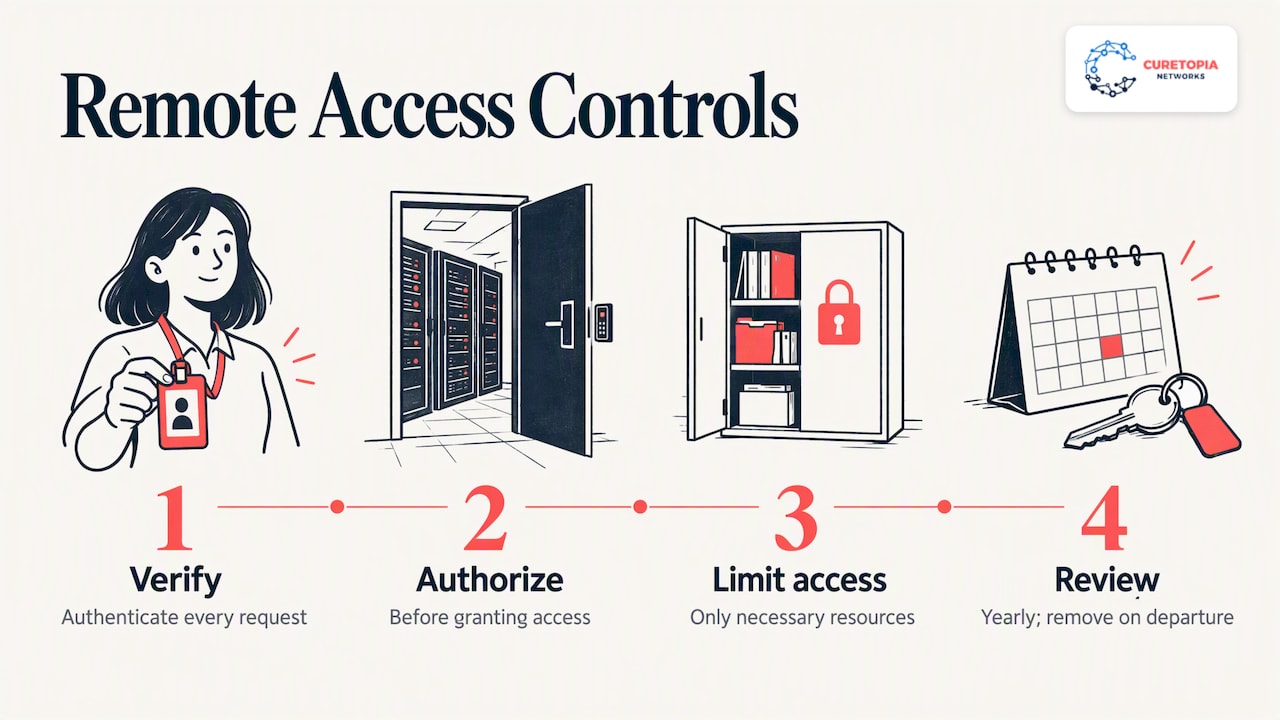
For a business, that translates simply. A bookkeeper does not need the engineering share. A contractor does not need the whole tenant. Review who can reach what at least once a year, and remove access the day someone leaves.
Decide what to do about personal devices
Bring-your-own-device is where many small businesses get into trouble. NIST notes that risks from personal and third-party-controlled devices can be reduced by setting up a separate, dedicated network for BYOD use that grants no more access to enterprise resources than standard remote access. In plain terms: personal devices get a narrower door than company laptops.
Many of our clients solve this with virtual desktops or a private cloud, so work happens in a controlled environment and data never lands on the home computer. See our virtual desktop solutions and private cloud services for how that works.
Keep your cloud suite tight
Most remote teams live in Microsoft 365 or Google Workspace. Default settings are rarely enough: conditional access, external sharing rules, mailbox auditing and device compliance all need deliberate configuration. Our Microsoft 365 and cloud management and Google Workspace management pages describe what ongoing administration looks like.
Assume something will go wrong
Backups are the control that turns a disaster into an inconvenience. Keep copies that an attacker who owns a user’s account cannot delete, and test restores on a schedule. A backup you have never restored is a hope, not a plan.
What a remote work policy should include
A policy is the place where decisions become expectations. CISA’s guidance on mobile workplace security says a policy should identify who may telework, define device requirements and information restrictions for company-furnished and personal devices, address alternate-worksite safety, cover phishing and social engineering training, and specify conditions that warrant discipline. That guidance is written for federal agencies, but the structure translates cleanly to a private employer.
NIST adds a useful mindset: write the policy on the assumption that approved alternate worksites contain hostile threats. That keeps the policy practical rather than trusting.
For a 20 to 200 person organization, a workable policy fits on two or three pages and covers:
- Eligibility: which roles may work remotely, from where, and whether work from outside the U.S. is allowed.
- Devices: what is company-managed, what personal devices may do, and what must never be stored locally.
- Access: MFA required, approved tools only, no shared accounts.
- Data handling: what counts as confidential, how to share it, and screen and printing rules in public or shared spaces.
- Home network basics: updated router firmware, a unique Wi-Fi password, no default admin credentials.
- Incident reporting: who to contact, how fast, and a promise that reporting a mistake is safe.
- Consequences: what happens when the rules are knowingly broken.
If you are in a regulated field, such as accounting, healthcare or financial services, add the specific requirements of your regulator and client contracts. Our CPA firm IT security checklist shows how that looks for one industry.
Teach people to spot and report phishing
Technology filters most bad email, not all of it. CISA’s telework toolkit advises that employees learn to recognize phishing tactics, use caution with links and attachments, know the organization’s procedures for reporting suspicious activity, and report promptly to IT security.
Three habits make the biggest difference:
- Pause on urgency. Requests to change bank details, buy gift cards or “quickly” share a file are the classic pattern.
- Verify by another channel. Call the person on a number you already have, not one in the message.
- Report fast, without blame. Employees who fear punishment hide mistakes, and hidden mistakes are the expensive ones.
Make reporting a one-click action in email or a single shared inbox, and tell people exactly who answers.
Can your employer see what you do on a work computer?
This comes up from both sides. Employees ask it, and owners ask what they are allowed to do. On company-managed devices, employers commonly install management and security software that can inspect activity, and that is why a policy should state plainly what is monitored and why. Workers should read their organization’s acceptable-use and monitoring sections before assuming anything is private.
Privacy-protective design is possible. In a federal telework video-conferencing pilot, for instance, employees could turn off the camera and close its physical shutter, after which it could not be turned on remotely. If you manage devices, decide what you need to see, tell people, and collect no more than that. Monitoring laws vary by state, so have counsel review your wording.
Is 100% secure remote work possible?
No, and any vendor who says otherwise is selling you something. People make mistakes, software has flaws, and attackers adapt. Office-based work is not 100% secure either.
The better question is whether you have made a successful attack unlikely, contained when it happens, and recoverable afterward. That means layered controls rather than a single product, which is the thinking behind assuming breach in the Zero Trust model. CISA and NIST also recommend that all organizations adopt their Cross-Sector Cybersecurity Performance Goals, a minimum set of practices against common and damaging threats. It is a reasonable yardstick for a business with no security team.
Our perspective: security fails in the gaps between tools
Most remote work incidents we see are not exotic. They come from an unmanaged laptop, an MFA exception granted “temporarily” two years ago, a backup nobody tested, or a former employee whose account still works. Each of those is a gap between tools, or between people who each assumed someone else owned the task.
That is why we manage IT as one integrated environment rather than a pile of separate products. Identity, devices, cloud apps, network, backups and strategy are connected, and a weakness in one undermines the rest. When a single team looks after all of it, we can fix root causes instead of patching the same symptom every few months, and you know exactly who is accountable.
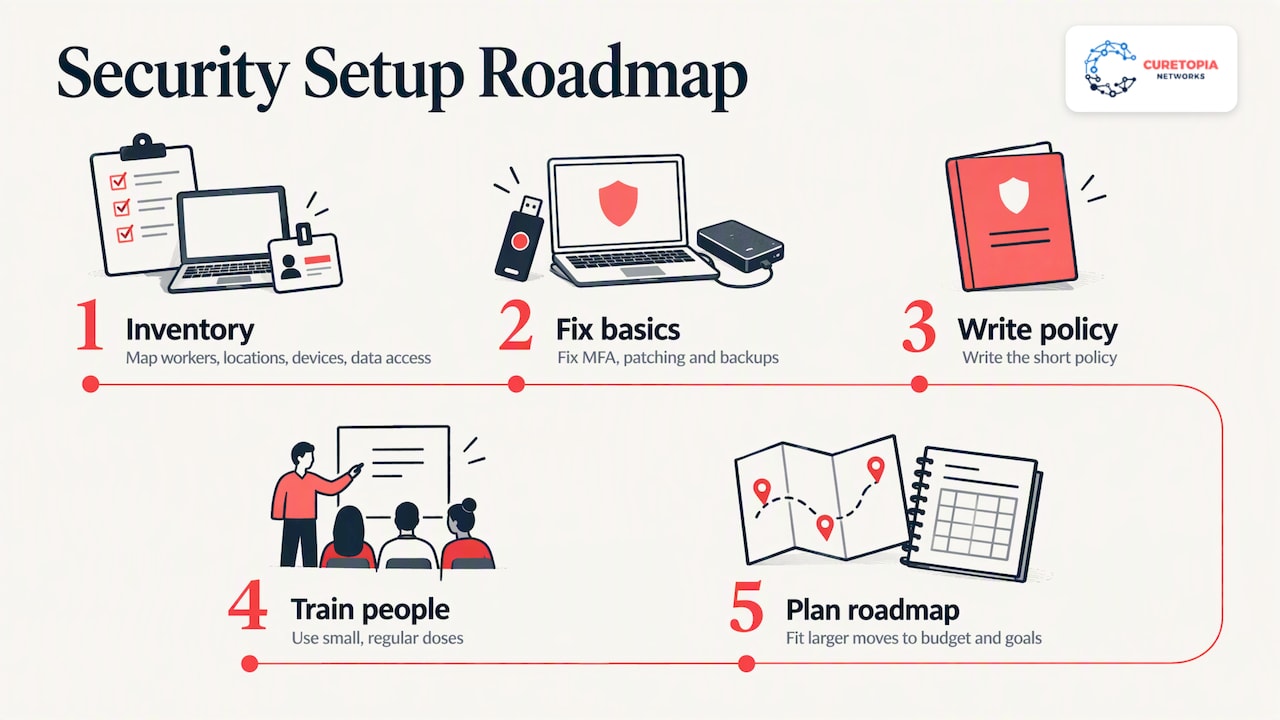
Our advice for a business starting out: do not begin with a tool purchase. Begin with an inventory of who works where, on what device, with access to which data. Fix MFA, patching and backups. Write the short policy. Train people in small, regular doses. Then plan the larger moves, such as virtual desktops or a private cloud, on a roadmap that fits your budget and goals. Security that people can live with is the security that lasts.
— Cameron
How Curetopia Networks can help
If your team is remote or hybrid and nobody owns security day to day, that is the situation we are built for. Curetopia Networks provides managed IT services and cybersecurity services for organizations in Indianapolis and Central Indiana, covering devices, Microsoft 365 and Google Workspace, networks, backup and disaster recovery, and a technology roadmap through our vCIO service. If you already have an internal IT person, our co-managed IT option adds capacity and security depth alongside them.
FAQ
Is it possible to be 100% secure when working remotely?
No. No environment, remote or in-office, can be made completely risk-free. The realistic goal is layered protection: MFA, managed and updated devices, limited access, trained staff and tested backups, so an incident is unlikely, contained and recoverable.
What is the first thing a small business should do to secure remote work?
Turn on MFA for every internet-facing business account, beginning with email and any system holding client or financial data. Federal guidance for small and midsize organizations puts MFA at the top of its priority list. Next, make sure devices update automatically and your backups have been restored successfully at least once.
Do employees need a VPN to work from home?
Not always, but they need a protected path to company resources. A secure VPN with MFA is one option, and many cloud-first businesses instead rely on strong identity controls, device compliance checks and application-level access. The right answer depends on where your data lives, so decide it as part of your access design.
Can my employer remotely access my work computer?
On a company-managed device, usually yes, through management and security tools. Check your organization’s acceptable-use and monitoring policy to see what is collected. Employers should state this clearly, and state laws differ, so have an attorney review monitoring language.
Is remote work going away?
We cannot predict workplace trends, but most of our clients operate some mix of office and remote work and expect to keep it. Whatever the schedule, plan security so it does not depend on where people sit.
Sources
- CISA TIC 3.0 Remote User Use Case
- TechTarget: 10 remote work cybersecurity risks and how to prevent them
- Canadian Centre for Cyber Security: Security tips for organizations with remote workers
- CISA and partners: Phishing Guidance, Stopping the Attack Cycle at Phase One
- Australian Department of Home Affairs: Back to Business, hybrid workforce
- Microsoft: Secure remote and hybrid work with Zero Trust
- NIST SP 800-46 Rev. 2: Guide to Enterprise Telework, Remote Access, and BYOD Security
- CISA: Federal Mobile Workplace Security, 2024 Edition
- CISA: Telework Essentials Toolkit
- FTC: Video Teleconferencing Pilot Privacy Impact Assessment
- CISA and NIST: Primary Mitigations and Cross-Sector Cybersecurity Performance Goals