
IT Consulting Services: What They Cover and How to Choose
IT consulting services are outside experts who assess your technology, plan it around your business goals and help run it. For most small and midsize businesses, the best version is not a one-off report. It is an ongoing relationship where the people who design your IT strategy are also the people accountable for keeping it running and secure. That is how we approach it at Curetopia Networks for organizations in Indianapolis and Central Indiana: vCIO and IT consulting sits alongside the day-to-day management it directs.
This guide explains what IT consultants actually do, the types of providers you will meet, how strategy consulting works, and the questions that separate a dependable partner from a vendor who hands you a binder and leaves.
TL;DR
- IT consulting covers infrastructure assessment, technology planning, cybersecurity, cloud migration and project management. The label is broad, so the scope in writing matters more than the name.
- A good IT strategy ties each technology action to a business objective and turns it into a 12-to-24-month roadmap with named owners.
- You can outsource IT work, but you stay responsible for policies, culture and compliance. Pick a provider who makes that accountability visible.
- Advice is only as good as its follow-through. Strategy, security and support work best when one team handles all three.
- Local businesses in Central Indiana can start with a free IT assessment to see where they stand.
Table of Contents
- What IT consulting services include
- Consultant, managed service provider or security provider: three kinds of firm
- How IT strategy consulting works
- Cybersecurity belongs inside the consulting scope
- When to bring in an IT consultant
- What a typical engagement looks like
- How to choose an IT consulting provider
- What IT consulting costs
- Our perspective
- Talk to a local team about your IT
- FAQ
- Sources
What IT consulting services include
IT consulting is also called technology consulting. A consultant advises and supports a business in designing, building and running technology that serves its goals. CIO.com describes the work as assessing infrastructure, cybersecurity profile, software performance and data operations, and notes that consultants may work for firms or as independent contractors.
In practice, the services fall into a handful of groups. Deltek’s guide to IT consulting lists them as:
- Infrastructure assessment and planning: reviewing networks, servers, devices and cloud services to see what you have, what is aging and what is missing.
- Strategic technology planning: deciding what to buy, replace or retire, and in what order.
- Software and application development: custom tools and integrations.
- Cybersecurity consulting: vulnerability assessment, security frameworks, monitoring and incident response.
- Cloud computing and migration: moving email, files and applications to platforms such as Microsoft 365 or Google Workspace, or to a private cloud.
- IT project management: carrying a project from inception to completion.
Not every business needs every item. A 40-person accounting firm and a manufacturer with a plant floor full of connected equipment will ask for very different things. What they share is the need for someone who looks at the whole environment instead of one symptom at a time.
Consultant, managed service provider or security provider: three kinds of firm
Searching for IT consulting brings up three overlapping types of provider. The Cyber Readiness Institute, a nonprofit that helps small businesses with cybersecurity, separates them clearly:
| Provider type | What it typically does | Best suited to |
|---|---|---|
| IT consultant | Acts like an “IT handyman”: prevents and fixes problems such as network and WiFi setup, websites, software, email and backups | Specific projects or occasional help |
| Managed service provider (MSP) | Typically a small firm offering similar services on an ongoing basis, often certified across multiple hardware and software vendors | Businesses that want continuous management of their IT |
| Managed security service provider (MSSP) | Intrusion mapping, log checking, risk assessment, compliance, monitoring and incident response | Organizations whose main gap is security operations |
The lines blur. Many firms do all three, and the consulting label is often applied to what is really a managed service. When you compare proposals, ignore the label and read what the provider will do each month, who answers the phone and who owns the result.
Project work versus an ongoing relationship
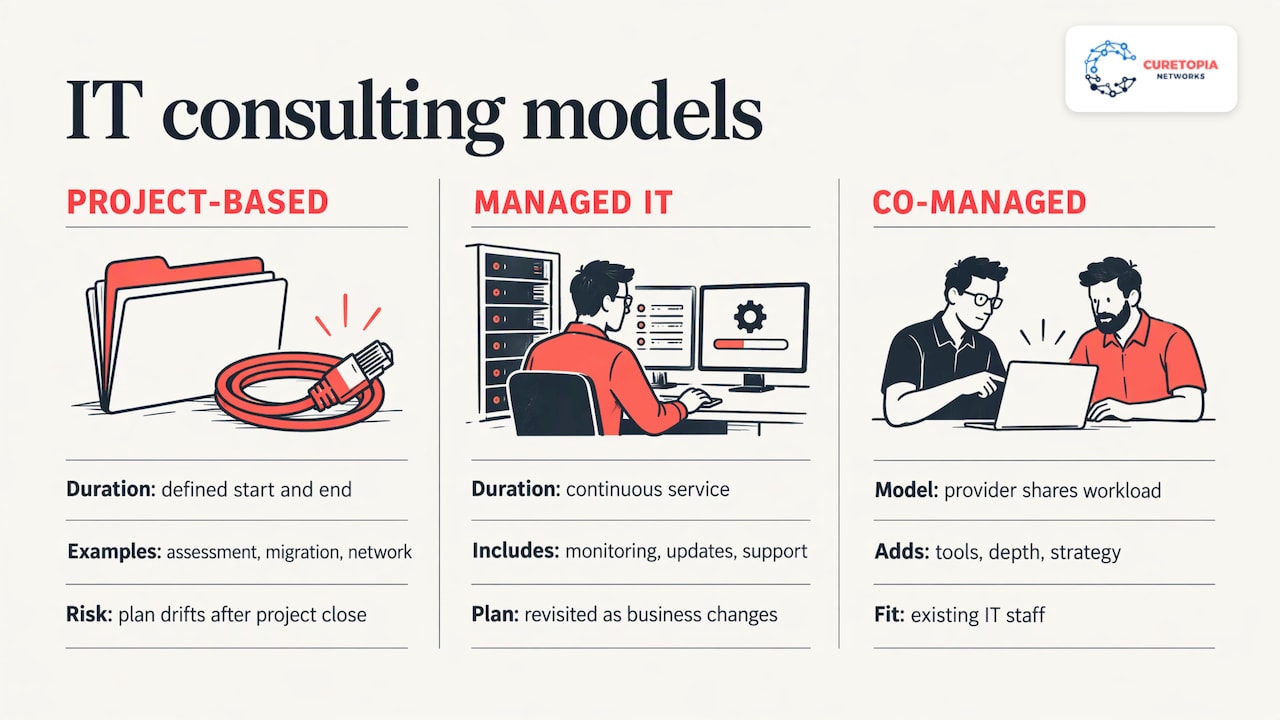
Project-based consulting has a start and an end: an assessment, a migration, a new network. It suits a defined need. The weakness is the day after the project closes. Software ages, staff change, new threats appear and the plan on the shelf drifts out of date.
Managed IT consulting folds the advice into continuous service. The same team that writes the roadmap monitors the systems, applies the updates, supports your staff and revisits the plan as the business changes. For a company without an internal IT department, that continuity is the practical difference between a recommendation and a result. Our managed IT services are built on that idea: all aspects of IT handled as one integrated environment, with proactive support and clear accountability.
If you already have an internal IT person or small team, co-managed IT lets the provider share the load, adding tools, depth and strategy to the people you have.
How IT strategy consulting works
IT strategy consulting, the second most searched variation of this topic, answers one question: what should technology do for this business over the next few years, and in what order do we get there?
Gartner, the research and advisory firm, explains that a good IT strategy defines how information and technology help the business meet its objectives, by working through three things: context (where the business stands), direction (where it is going) and actions (what technology must do to get there). Each action connects to a specific element of the business strategy. The plan then bridges strategy and execution with a 12-to-24-month roadmap of initiatives, each aligned to strategic objectives with defined accountability.
For a small business, that translates into a few concrete outputs:
- An inventory and assessment. What devices, applications, accounts and contracts exist, and what condition they are in.
- A set of business priorities. Opening a second location, supporting remote staff, meeting a client’s security requirements, cutting downtime.
- A roadmap. Projects ranked by risk and value, with timing and a budget range, so spending is planned instead of reactive.
- Regular reviews. A recurring check that the roadmap still matches the business.
That last item is where many engagements fail. A plan reviewed once is a document. A plan reviewed every quarter is a management tool. This is the role of a virtual CIO: a senior advisor who owns the roadmap for you, without the cost of a full-time executive hire. We cover it on our vCIO and IT consulting page.
A worked example
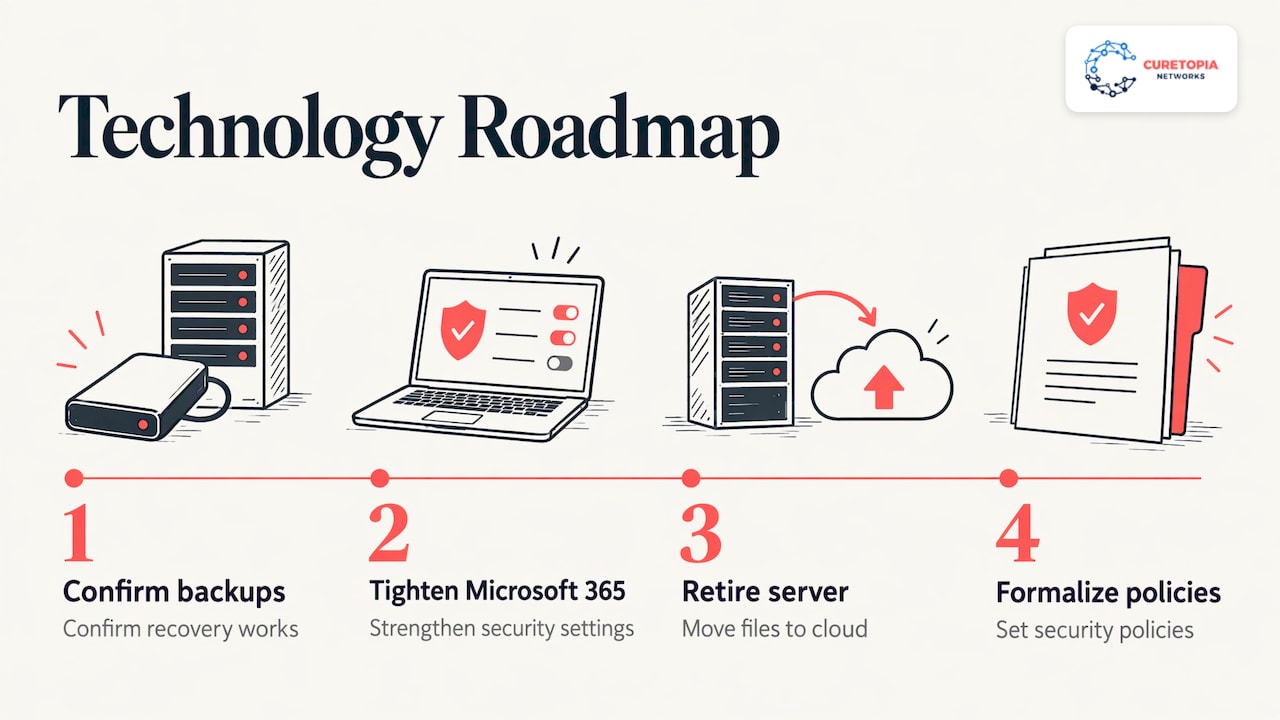
Imagine a 30-person professional services firm in Indianapolis. Email lives in Microsoft 365, files sit on an aging server in a closet, backups run on a schedule nobody has tested, and the owner wants to add remote work and meet a client’s request for stronger security controls.
A strategy engagement would start by assessing all of it. The roadmap might then sequence the work: first confirm backups and recovery, then tighten Microsoft 365 security settings, then retire the server and move files to the cloud, then formalize security policies. Each step is tied to a stated goal (keep the client, allow remote work, reduce outage risk) and has an owner and a time frame. The firm’s leadership can see what is being done, why, and what it costs, which is exactly what “aligning technology with business goals” is supposed to mean.
Cybersecurity belongs inside the consulting scope
Business IT consulting used to mean networks and software. Today security runs through every part of it. A cloud migration, a new remote-work setup or a vendor change each carries security decisions, so treating security as a separate purchase tends to leave gaps between teams.
The numbers on what small and midsize firms are focused on are telling. A 2025 survey of 1,285 SMB leaders by TSL Tech Research found that 60% plan to invest in cybersecurity in the following 12 months. Among mid-sized businesses, the top concerns were ransomware (48%), data breaches (42%) and employee negligence (39%). The services those leaders called must-haves were annual employee security training (75%), a documented incident response plan (68%) and annual security audits (68%).
Notice what that list contains. Training, a written response plan and audits are not products you install once. They are recurring practices that need someone to schedule, run and follow up on them. That is another argument for an ongoing partner over a single engagement. If security is your main driver, see our cybersecurity services, and for a closer look at the first step, our guide to a cybersecurity risk assessment. Indiana organizations will also find our small business cybersecurity guide useful, and regulated or contract-driven firms can read about cybersecurity compliance services.
When to bring in an IT consultant
Most businesses call for help in one of a few situations:
- Recurring problems. The same outage, slow network or email trouble keeps returning, and fixes only hold for a while. Repeat issues usually point to a root cause nobody has diagnosed.
- Growth or change. A new office, an acquisition, a move to remote or hybrid work, or a new line of business.
- A security event or a client demand. An incident, a cyber insurance questionnaire, or a customer asking for proof of controls.
- No internal owner. Technology decisions are being made by whoever is available, often the office manager or the owner.
- Upcoming spend. Hardware reaching end of life, a software migration or a lease renewal where a wrong decision is expensive.
If two or three of these sound familiar, an outside view will likely save more than it costs. A free first look is a low-pressure way to begin: we offer a free IT assessment for businesses in the Indianapolis area.
What a typical engagement looks like
The details vary by provider, but a well-run relationship follows a recognizable sequence:
- Discovery. The provider learns your business, people, applications and risks, and reviews your current environment.
- Assessment and findings. You receive a plain-language picture of what is working, what is at risk and what to fix first.
- Roadmap and budget. Priorities are ranked and tied to business goals, with timing you can plan around.
- Onboarding. Systems are brought under management, monitoring and backups are confirmed, and your staff learn how to get help.
- Ongoing management. Support, updates, security monitoring and routine maintenance run continuously.
- Reviews. Regular check-ins keep the roadmap current and show you what was done.
Ask any provider to walk you through their version of these six stages. The ones that cannot describe their own process in simple terms are unlikely to run yours well.
How to choose an IT consulting provider
The National Institute of Standards and Technology (NIST), the federal standards agency, keeps a vendor and service provider page for small businesses that points to a five-part Cyber Readiness Institute series. It covers whether to get outside help, the types of firms, selecting the right level of support and understanding the cybersecurity vendor contract. It is a good reference to keep next to any proposal.
Here are the criteria that matter most, and what to look for in each.
Scope in writing
A proposal should say exactly what is included: which systems, which users, which hours, which security services. Vague promises of “full support” cause the most disputes. Make sure backup and disaster recovery, Microsoft 365 or Google Workspace administration, network management and security monitoring are either listed or explicitly excluded.
Accountability you can see
The Cyber Readiness Institute guide makes a point every owner should absorb: you can outsource tasks such as software updates, but you remain ultimately responsible for your policies, your cyber-ready culture and your privacy and security compliance obligations. So you need a provider who gives you the reporting, documentation and regular conversations that let you carry that responsibility with confidence. Look for named contacts, defined response expectations and routine reports, not just a ticket queue.
Strategy and support under one roof
If one firm writes the roadmap and another runs the systems, nobody owns the gap between them. A single team that plans, secures and supports the environment can trace a recurring problem to its root cause and fix it once. This is the heart of our approach: diagnosing and resolving root causes rather than applying ad-hoc fixes.
Local presence
For a business in Central Indiana, a provider who knows the local market, can be on site and understands your industry’s requirements removes friction. See how we serve different sectors on our industries page, including accounting and CPA firms and nonprofits.
Security practices of the provider itself
Your IT provider holds the keys to your systems, so its own security matters as much as yours. Understanding how a vendor security review works, including the role of independent audit reports and data processing agreements, helps you ask better questions. A primer on vendor security reviews walks through the usual checkpoints before a supplier is approved.
Questions to ask in a first meeting
- Who will be my day-to-day contact, and who covers when they are out?
- What does your onboarding involve, and how do you avoid disruption while switching?
- How do you handle backups and recovery, and how do you confirm they work?
- What will I receive in regular reports?
- How is the roadmap built, and how often is it reviewed?
- What does the agreement say about security responsibilities on each side?
What IT consulting costs
Pricing models differ: hourly rates for projects, fixed fees for defined engagements, and recurring monthly agreements for managed services, often priced per user or per device. We do not publish prices, because the right figure depends on your size, systems and the level of support you need. A fair provider will give you a written quote tied to a clear scope. When comparing quotes, compare what is included, not only the total, and weigh them against what an hour of downtime or a security incident would cost your own business.
Our perspective
Many businesses come to us after a run of one-off fixes. A contractor patched the network, another set up email, someone else installed backups. Each job was done, yet the business still had outages, no clear picture of its risks and no plan for next year.
We think the answer is to treat IT as one integrated environment. Strategy, security, cloud, backups and daily support should be handled together, because problems rarely respect the boundaries between them. When one team is accountable for all of it, root causes get found and fixed instead of being worked around.
That is why we pair vCIO planning with managed and co-managed support. The roadmap tells you where technology is going, and the people managing your systems are the same people responsible for getting you there. You get proactive support, clear accountability and fewer surprises.
If you are weighing IT consulting, start with the business outcome you need, then choose the partner who will still be answering the phone after the plan is delivered.
Cameron
Talk to a local team about your IT
Curetopia Networks provides managed IT services, cybersecurity, Microsoft 365 and Google Workspace management, backup and disaster recovery, network and infrastructure management, private cloud, virtual desktops and vCIO consulting for businesses in Indianapolis and Central Indiana. If you want a clear view of where your technology stands and what to do about it, our managed IT services in Indianapolis team can start with a conversation.
Begin with the free IT assessment, or read more on our IT insights blog.
FAQ
What services do IT consultants provide?
IT consultants assess infrastructure, plan technology strategy, advise on cybersecurity, guide cloud migrations and manage IT projects. Some also build custom software. Many firms add ongoing management, so a single provider can plan, secure and support your environment.
How is IT consulting different from managed IT services?
Consulting is often project-based, such as an assessment or a migration with a defined end. Managed IT services are continuous: monitoring, support, updates and security handled for a recurring fee. Combining the two means the advice is carried out and kept current.
Do small businesses need IT strategy consulting?
Yes, if technology affects revenue, client trust or compliance, which it does for nearly every business. Small firms benefit from a short, practical roadmap that ranks priorities and budgets. A vCIO service provides that guidance without a full-time executive hire.
How do I know when it is time to hire an IT consultant?
Common signals are repeating technical problems, growth or relocation, a security incident, a client requirement for stronger controls, or no one inside the company owning technology decisions. Any one of these is reason enough to get an assessment.
Sources
- What is IT Consulting? A Comprehensive Guide
- An Introduction to Firms that Offer IT and Cybersecurity Support (Cyber Readiness Institute)
- What is an IT consultant? Roles, types, salaries, and how to become one (CIO.com)
- Build a Better IT Strategic Plan (Gartner)
- 2025 IT Security Insights from 1,285 SMB Leaders (TSL Tech Research)
- Choosing a Vendor/Service Provider (NIST)